
Google’s Gemini API pricing page lists all the numbers, but calculating your actual costs means understanding six different components that interact in non-obvious ways. Here’s how it actually works.
How Gemini API Costs Are Calculated
When you look at Google’s pricing tables, you see per-million-token rates for different models. But your actual bill depends on six separate cost components that stack together:
The Formula
+ Thinking Tokens
+ Prompt Length Tier
+ Context Caching
+ Grounding Fees
+ Multi-Modal Multipliers
⚡ What You Need to Know
Unlike simple “per-token” pricing, Gemini can charge you across six different dimensions in a single API call. Most cost calculators only show you the first one.
Here’s what each component means:
Base Model Costs are straightforward—input tokens and output tokens at the listed rates. This is what most people budget for.
Thinking Tokens are hidden reasoning tokens that certain models generate internally. You pay for these even though you never see them in the response.
Prompt Length Tier is where it gets weird. Some models double their per-token price when your prompt exceeds 200,000 tokens.
Context Caching has two charges: a per-token fee to cache your content, plus an hourly storage fee. It only saves money in specific scenarios.
Grounding Fees apply when you use Google Search or Maps integration. One user request can trigger multiple search queries, each billed separately.
Multi-Modal Multipliers convert images, audio, and video into token equivalents at different rates depending on the content type and model.
The complexity isn’t just academic—these components can dramatically change your costs. A chatbot that looks like it’ll cost $200/month based on base tokens alone might actually run $400/month once thinking tokens and grounding fees hit. A RAG system with large context windows might suddenly double in price when it crosses the 200k token threshold.

Detailed prices for all models are listed on the official Gemini API pricing page:
https://ai.google.dev/gemini-api/docs/pricing
Let’s break down each component so you can actually estimate what you’ll pay.
Base Model Costs: Input & Output Tokens
This is the straightforward part—the foundation of your Gemini API bill. You pay separately for tokens sent to the model (input) and tokens the model generates (output).
How Token Counting Works
Every API call has two token counts:
Input tokens include everything you send: your system prompt, conversation history, user query, and any additional context like retrieved documents. If you’re building a RAG chatbot and you send 50,000 tokens of context plus a 100-token user question, that’s 50,100 input tokens.
Output tokens are what the model generates in response. A short answer might be 200 tokens. A detailed code explanation might be 1,500 tokens. You’re billed separately for these at different rates—output tokens typically cost 5-15x more than input tokens, depending on the model.
Google charges per million tokens, but most developers think in terms of individual requests. Here’s the conversion: if a model charges $1.25 per million input tokens, one request with 50,000 input tokens costs $0.0625 (that’s 50,000 ÷ 1,000,000 × $1.25).
Standard vs. Batch API Pricing
Google splits their pricing into two tracks, and you’ll see this throughout their tables:
Standard API processes requests in real-time. You send a prompt, you get an immediate response. This is what most applications use.
Batch API processes requests asynchronously with up to 24-hour latency in exchange for 50% off. You submit a batch of requests, Google processes them when capacity allows, and you retrieve results later. The cost savings are significant, but the tradeoff is latency and added integration complexity—you need infrastructure to queue requests and handle async responses.
Both tracks charge the same six cost components we outlined earlier, just at different rates for batch. For now, we’re focusing on standard pricing since that’s what most developers start with. We’ll cover batch API details and when it makes sense in a dedicated section later.
Model Tier Breakdown
Gemini API offers multiple models at different price points. Here’s how they stack up:
Flash-Lite Models (Cheapest)
Gemini 2.5 Flash-Lite and 2.0 Flash-Lite are the budget options, designed for high-volume, simple tasks.
- Input: $0.075-$0.10 per million tokens
- Output: $0.30-$0.40 per million tokens
Use these for: classification tasks, simple Q&A, high-throughput scenarios where you need basic understanding but not deep reasoning. They’re fast and cheap, but they won’t handle complex multi-step reasoning well.
Flash Models (Mid-Tier)
The latest Gemini 3 flash, Gemini 2.5 Flash and 2.0 Flash balance cost and capability—they’re Google’s workhorses.
- Input: $0.10-$0.50 per million tokens (text/image/video)
- Output: $0.40-$2.50 per million tokens
These models support thinking budgets and reasoning while staying reasonably priced. Use them for: most production chatbots, coding assistance, document analysis, multi-modal applications. The 2.5 Flash model is also Google’s first hybrid reasoning model, which means thinking tokens will affect your costs (more on that in the next section).
Pro Models (Premium)
Gemini 2.5 Pro and 3 Pro are the high-end options for complex reasoning and coding tasks.
- Input: $1.25-$4.00 per million tokens (depending on prompt length)
- Output: $10.00-$18.00 per million tokens (including thinking tokens)
Use these for: complex coding tasks, advanced reasoning, agentic workflows, situations where quality matters more than cost. The Pro models excel at multi-step problem solving, but that reasoning capability comes with thinking tokens that can significantly increase your output costs.
Specialized Models
Google also offers specialized models for specific use cases:
- Image generation (Imagen, Flash Image, Pro Image): Priced per image ($0.02-$0.24 depending on resolution and model)
- Video generation (Veo): Priced per second ($0.15-$0.40 depending on speed/quality tier)
- Audio models (TTS, Native Audio): Different token rates for audio processing
- Embeddings: $0.15 per million tokens (both free and paid tiers)
We’ll cover multi-modal pricing in detail later, but the key point: these aren’t token-based like text models—they’re priced per output unit.
Rate Limits and Free Tier
The free tier gives you access to most models with generous limits for testing and small projects. Key differences between free and paid:
Free tier:
- Lower rate limits (requests per minute/day)
- Your data may be used to improve Google’s products
- Some models unavailable (like Gemini 3 Pro)
- Still useful for prototyping and low-volume applications
Paid tier:
- Higher rate limits for production scale
- Your data is not used for model improvement
- Access to all models including premium ones
- Context caching available (free tier doesn’t support this)
The free tier is legitimately useful for development and small-scale projects—Google’s limits are more generous than OpenAI’s or Anthropic’s free offerings. But once you hit production scale or need data privacy guarantees, you’ll need to upgrade to paid.
Rate limits vary by model and tier. Check Google’s documentation for current limits, as they adjust these periodically based on capacity. If you’re planning high-volume usage, factor rate limits into your architecture—you might need to spread traffic across multiple models or implement queuing.
Thinking Tokens: What They Are & Things to Know
Here’s something that’ll mess with your cost estimates: thinking tokens. Certain Gemini models generate internal reasoning tokens that you never see in the response, but you pay for them anyway.
If you’re used to other APIs where output cost equals visible output, this’ll catch you off guard.
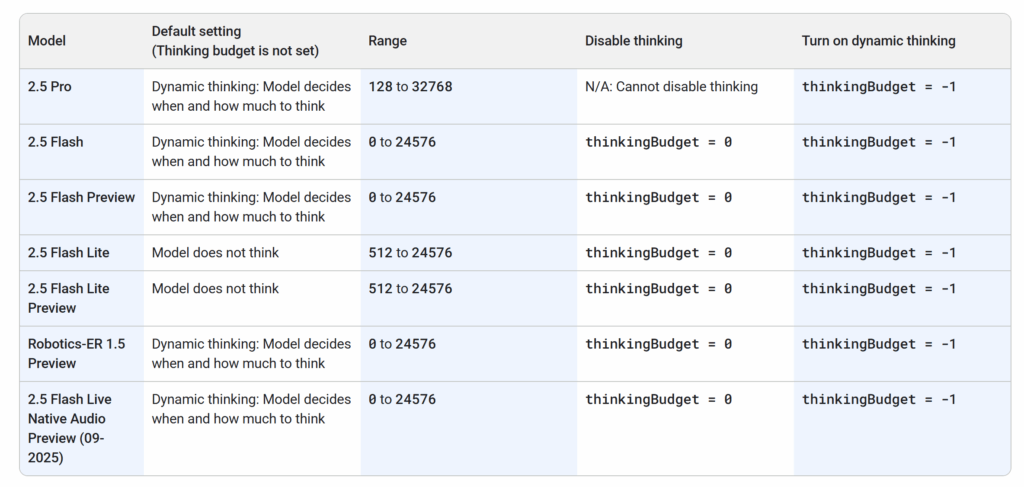
What Thinking Tokens Actually Are
When you use a reasoning model like Gemini 2.5 Flash or 2.5 Pro, the model doesn’t just generate your visible response—it first does internal “thinking” to work through the problem. These intermediate reasoning steps consume tokens that get billed as output tokens, even though they’re never returned to you.
Think of it like watching someone solve a math problem. The final answer might be three sentences, but they filled two pages with scratch work to get there. You’re paying for both the scratch work and the final answer.
Google’s pricing tables note this: “Output price (including thinking tokens).”
That parenthetical is doing a lot of work—it means the output token price covers both visible and invisible tokens, and it means the output token price covers both visible and invisible tokens—they’re billed at the same rate, though you can see the breakdown in your API response.
Which Models Use Thinking Tokens
Not all Gemini models generate thinking tokens. Here’s the breakdown:
Models with thinking tokens:
- Gemini 3 Flash
- Gemini 2.5 Flash (hybrid reasoning model)
- Gemini 2.5 Flash Preview
- Gemini 2.5 Flash-Lite (and preview)
- Gemini 2.5 Pro
- Gemini 3 Pro Preview
- Gemini Robotics-ER 1.5 Preview
- 2.5 Flash Live Native Audio Preview (09-2025)
Models without thinking tokens:
- Gemini 2.0 Flash
- Gemini 2.0 Flash-Lite
- All specialized models (Imagen, Veo, TTS, embeddings)
The pattern: reasoning-focused models use thinking tokens, lightweight and specialized models don’t. If your use case doesn’t need complex reasoning, you can avoid thinking tokens entirely by choosing Flash-Lite or 2.0 Flash.
How to Estimate Thinking Token Costs
Google actually gives you direct visibility into thinking token counts—you don’t have to guess. Every API response includes thoughtsTokenCount in the usage_metadata field, showing exactly how many thinking tokens that request consumed.
Here’s how to access it:
response = client.models.generate_content(
    model="gemini-2.5-pro",
    contents="Your prompt here"
)
print("Thinking tokens:", response.usage_metadata.thoughts_token_count)
print("Output tokens:", response.usage_metadata.candidates_token_count)
Your total output bill is thinking tokens plus visible output tokens. No hidden math—it’s right there in the response.
What to expect in practice:
For simple queries, thinking tokens might add 20-50% to your output count. Ask 2.5 Flash a straightforward question, get a 200-token response, and you might see 50-100 thinking tokens on top.
For moderate reasoning tasks, expect thinking tokens to roughly match or exceed your visible output. A 500-token explanation might come with 500-750 thinking tokens.
For complex reasoning—debugging code, multi-step problems, deep analysis—thinking tokens can hit 2-3x your visible output. A 500-token response might require 1,000-1,500 thinking tokens to generate.
Rule of thumb for initial budgeting: Before you have real usage data, multiply expected visible output by 2x for general use, 3x for reasoning-heavy tasks. Once you’re running actual requests, use thoughtsTokenCount to refine your projections with real numbers.
Pro tip: If you’re using thinking budgets to control costs, note that the model might overflow or underflow your specified thinkingBudget. It’s a guide, not a hard cap. Track actual usage to see where you land.
Why This Matters for Your Budget
Thinking tokens can dramatically change your cost calculations. Let’s work through an example:
You’re building a code review assistant using Gemini 2.5 Pro. Each review includes:
- 10,000 input tokens (the code to review)
- 800 visible output tokens (the review feedback)
Your initial estimate without thinking tokens:
- Input: 10,000 tokens × $1.25/1M = $0.0125
- Output: 800 tokens × $10.00/1M = $0.008
- Total per review: $0.0205
Your actual cost with thinking tokens (3x multiplier for complex reasoning):
- Input: 10,000 tokens × $1.25/1M = $0.0125
- Output: 2,400 tokens × $10.00/1M = $0.024
- Total per review: $0.0365
You’re paying 78% more than your initial estimate. At 10,000 reviews per month, that’s $205 versus $365—a $160/month difference.
For high-volume applications, thinking tokens can be one of your largest cost components. A customer service chatbot handling 100,000 queries per day might budget $500/month based on visible output but end up paying $1,200/month once thinking tokens hit.
Gemini API Thinking Tokens vs. ChatGPT & Claude
This isn’t unique to Gemini. Anthropic’s Claude models also use thinking tokens (they call them “internal chain-of-thought”), and they bill the same way—bundled into output token costs without separate visibility. OpenAI’s latest GPT-5.X models show thinking tokens in the API response but bill you for them.
The difference is transparency: OpenAI tells you exactly how many thinking tokens each request used, while Google and Anthropic bundle them into your total output count. Neither approach changes the actual cost, but OpenAI’s visibility makes it easier to optimize.
If you’re switching from non-reasoning models (like GPT-4 or Claude 4.5 Sonnet in non-extended-thinking mode), thinking tokens will increase your costs compared to your previous baseline. Budget for it upfront rather than being surprised later.
Prompt Length Pricing: The 200k Threshold
Here’s one of the stranger parts of Gemini’s pricing structure: some models literally double their per-token price when your prompt exceeds 200,000 tokens.
Not gradual scaling—a hard cliff where costs jump 2x the moment you cross the threshold.

How the Threshold Works
For models with tiered prompt pricing, Google charges one rate for prompts up to 200k tokens and a higher rate for prompts over 200k tokens.
The pricing applies to your entire prompt, not just the tokens over the threshold.
Example with Gemini 2.5 Pro:
- Prompts ≤ 200k tokens: $1.25 per million input tokens
- Prompts > 200k tokens: $2.50 per million input tokens
If you send a 199,999-token prompt, you pay $1.25/1M. If you send a 200,001-token prompt, you pay $2.50/1M—double the rate, applied to all 200,001 tokens.
The same doubling happens for output tokens based on your input prompt length—if your prompt exceeds 200k tokens, both input and output rates jump to the higher tier.
Which Models Have This Threshold
Not all Gemini models use tiered pricing. Here’s the breakdown:
Models with 200k threshold:
- Gemini 2.5 Pro (input: $1.25 → $2.50, output: $10 → $15)
- Gemini 2.5 Computer Use Preview (input: $1.25 → $2.50, output: $10 → $15)
- Gemini 3 Pro Preview (input: $2.00 → $4.00, output: $12 → $18)
Models without tiered pricing (flat rate regardless of prompt length):
- All Flash models (2.5 Flash, 2.0 Flash, Flash-Lite)
- All specialized models (Imagen, Veo, TTS)
- Embedding models
The pattern: only the Pro-tier reasoning models have this threshold. If you’re using Flash or Flash-Lite, prompt length doesn’t affect your per-token rate.
When You’d Actually Hit This Threshold
200,000 tokens is a lot of context—roughly equivalent to 150,000 words or about 300 pages of text.
Most applications never get close to this. But certain use cases hit it routinely:
RAG systems with large knowledge bases. If you’re embedding entire documentation sets or code repositories into your context window, you can easily exceed 200k tokens. A developer tool that loads an entire codebase for analysis might send 250k-500k tokens per request.
Long conversation histories. A customer service chatbot that maintains full conversation history for context could accumulate 200k+ tokens after extended interactions, especially if previous conversations are included for personalization.
Document analysis at scale. Processing large legal documents, research papers, or business reports in a single call. A contract review system analyzing 500 pages of legal text would cross the threshold.
Multi-document comparison. If you’re comparing multiple long documents simultaneously—like analyzing three different 100-page proposals—you’ll exceed 200k tokens.
The question you should ask your self is:
Does your use case require keeping massive amounts of context in a single prompt, or can you break it into smaller chunks?
How to Estimate If You’ll Cross the Threshold
Token estimation before you send a request isn’t precise, but here are practical guidelines:
Text estimation: 1 token ≈ 4 characters for English text. So 200,000 tokens ≈ 800,000 characters ≈ 150,000 words. If your prompt content is shorter than a typical novel, you’re probably safe.
Code estimation: Code is denser than natural language—roughly 1 token per 2-3 characters depending on the language. A 100,000-line Python codebase with average 40 characters per line is roughly 2,000,000 tokens—way over the threshold.
Use token counting libraries: Google provides tokenization libraries for their models. Run your typical prompts through the tokenizer during development to see where you land. This is more accurate than character-based estimation.
Monitor in production: Track your actual token usage from API responses. Google returns usageMetadata showing exact token counts. If you’re consistently seeing prompts over 180k tokens, you’re at risk of crossing into the higher tier.
Practical check: If you’re dynamically building prompts (like RAG systems retrieving documents), implement a token counter that warns you before hitting 200k. Some developers set a soft limit at 190k tokens to stay safely under the threshold.
The Cost Impact
Let’s work through a real scenario to see how much this matters:
You’re building a code analysis tool using Gemini 2.5 Pro. Each analysis request includes:
- 250,000 tokens of code context (above the threshold)
- 2,000 token average response
Your cost per request:
- Input: 250,000 tokens × $2.50/1M = $0.625 (at the higher rate)
- Output: 2,000 tokens × $15.00/1M = $0.030 (also at the higher rate)
- Total: $0.655 per request
If you could stay under 200k tokens:
- Input: 190,000 tokens × $1.25/1M = $0.238
- Output: 2,000 tokens × $10.00/1M = $0.020
- Total: $0.258 per request
You’re paying 2.5x more per request by crossing the threshold. At 10,000 requests per month, that’s $6,550 versus $2,580—a $3,970/month difference.
For high-volume applications, this threshold can be one of your largest cost factors. The doubling applies to your entire prompt, not just the marginal tokens over 200k, which makes the cliff especially steep.
Gemini API Context Caching: Sounds Good, But…
Context caching sounds like an obvious win: cache your context once, reuse it across multiple requests, and save money on input tokens.
But the math is trickier than it appears.
You’re paying to cache, paying to store, and paying to use—and it only saves money if your usage pattern hits specific thresholds.
What Context Caching Actually Is
Context caching lets you store frequently reused content (like system prompts, knowledge base documents, or conversation history) on Google’s servers.
When you make subsequent requests, you reference the cached content instead of resending those tokens as regular input.
The theory: if you’re sending the same 50,000-token knowledge base in every request, cache it once and just send your unique 100-token queries. You save on input tokens for every request after the first.
The reality: caching has its own pricing structure with three separate charges, and whether it saves money depends on how frequently you’re actually reusing that cached content.
Two Types of Caching: Implicit vs. Explicit
Google offers two different caching mechanisms:
Implicit caching (automatic) is enabled by default on all Gemini 2.5 models as of May 8, 2025. Google automatically caches common content and passes on cost savings if your requests hit their caches. You don’t need to do anything—no code changes, no cache management, no complexity. If you send similar prompts repeatedly, you might get automatic savings.
The catch: no guarantees. Google caches what it thinks is common across users, not specifically for your use case. Minimum token counts: 1,024 for Flash, 4,096 for Pro.
Explicit caching (manual) is what the rest of this article focuses on. You manually create caches, control their lifetime, and get guaranteed cost savings—but you pay for caching, storage, and retrieval separately, and you manage the complexity yourself.
For most applications, start with implicit caching. You’re already getting it for free. Only move to explicit caching if you have high-volume, predictable usage patterns where the math clearly works out.
The rest of this section analyzes explicit caching—when you want guaranteed savings and are willing to manage the infrastructure.
The Three-Part Pricing Structure
Context caching isn’t a simple discount on input tokens—it has its own cost components:
1. Caching fee (one-time per cache creation): You pay a per-token fee to create the cache. This is typically 10% of the regular input token cost for that model.
Example with Gemini 2.5 Pro:
- Regular input: $1.25 per million tokens
- Caching fee: $0.125 per million tokens (for prompts ≤ 200k)
To cache 50,000 tokens costs $0.00625 upfront.
2. Storage fee (ongoing per hour): Once cached, you pay an hourly storage fee based on the cache size. This is where costs can sneak up on you.
For Gemini 2.5 Pro: $4.50 per million tokens per hour
That 50,000-token cache costs $0.000225 per hour or $0.0054 per day or $0.162 per month just sitting there.
3. Cache retrieval (per use): Each time you reference the cached content in a request, you’re charged at the caching rate (not the regular input rate).
For 2.5 Pro: $0.125 per million tokens (10% of regular input cost)
Each request using that 50,000-token cache costs $0.00625 for the cached portion, plus regular input pricing for any new tokens you send.
When Caching Actually Saves Money
Let’s work through the break-even math. You’re using Gemini 2.5 Pro with a 50,000-token knowledge base that you want to include in every request.
Without caching (per request):
- Input: 50,000 tokens × $1.25/1M = $0.0625
With caching:
- One-time caching fee: 50,000 × $0.125/1M = $0.00625
- Storage per hour: 50,000 × $4.50/1M per hour = $0.000225/hour
- Retrieval per request: 50,000 × $0.125/1M = $0.00625
Break-even calculation:
For caching to save money, you need:
(Caching fee + Storage fees) + (Retrieval cost × Number of requests) < (Regular input cost × Number of requests)
Simplifying:
$0.00625 + ($0.000225 × Hours) + ($0.00625 × Requests) < ($0.0625 × Requests)
The savings per request is: $0.0625 – $0.00625 = $0.05625
But you need to recover the caching fee and cover storage costs. Breaking it down:
If you use the cache for 1 hour:
- Caching saves you $0.05625 per request
- You spent $0.00625 (caching fee) + $0.000225 (storage) = $0.006475
- Break-even: ~0.12 requests (basically immediate)
If you use the cache for 24 hours:
- Storage cost: $0.000225 × 24 = $0.0054
- Total upfront: $0.00625 + $0.0054 = $0.01165
- Break-even: ~0.21 requests in 24 hours
If you use the cache for 30 days:
- Storage cost: $0.000225 × 720 hours = $0.162
- Total upfront: $0.00625 + $0.162 = $0.16825
- Break-even: ~3 requests over 30 days
The pattern: Caching makes sense if you’re hitting the cache frequently relative to how long it exists. For short-lived caches (hours to days) with high traffic, you save money. For long-lived caches (weeks to months) with infrequent access, storage fees eat your savings.
The Hidden Complexity Cost
Beyond the financial math, context caching adds operational complexity:
You need to manage cache lifecycles—creating, tracking expiration, refreshing as needed. Your code needs to handle cache misses gracefully. You’re debugging two code paths: cached and non-cached. For some organizations, the engineering time to implement and maintain caching costs more than just paying for regular input tokens.
If you’re a solo developer or small team, the complexity might not be worth marginal savings. If you’re at scale processing millions of requests per month, the savings justify the infrastructure investment.
Should I Use Context Caching?
Here’s a practical decision framework:
Use caching if:
- You’re sending the same large context (50k+ tokens) in hundreds or thousands of requests
- Your requests happen in concentrated time windows (hours to days, not weeks)
- You can programmatically manage cache lifecycles
- The savings (calculate it!) justify the engineering complexity
Skip caching if:
- Your context is small (<20k tokens)
- Requests are infrequent or spread over long periods
- Context changes frequently
- You’re still in development/testing phases
- The break-even analysis shows minimal savings
Most applications don’t need explicit caching. Implicit caching already handles common scenarios without any work from you. Explicit caching is built for large-scale deployments with predictable, high-volume usage patterns—think customer service systems handling thousands of queries per hour, not typical chatbot implementations.
Start simple: Use implicit caching (it’s automatic), measure your actual usage patterns, then evaluate if explicit caching would save meaningful money. Don’t optimize prematurely based on theoretical savings—let real data drive the decision.
If you’re spending less than $500/month on Gemini API costs, explicit caching probably isn’t worth the engineering overhead.
Gemini API Grounding Costs: Search & Maps
Grounding lets Gemini pull in real-time information from Google Search or Google Maps to enhance responses.
It sounds straightforward—enable grounding, get better answers. But the pricing structure is more complex than the base model costs, and one user request can trigger multiple billable queries without you knowing exactly how many.
What Grounding Actually Means
Many developers aren’t familiar with “grounding” as a concept, so let’s start there.
Grounding means connecting the model to external data sources to supplement its training knowledge. Instead of relying only on what Gemini learned during training (which has a knowledge cutoff), the model can query Google Search or Maps in real-time to get current information.
Example: A user asks “What’s the weather in Tokyo today?” A non-grounded model might give outdated or generic information. A grounded model queries Google Search, retrieves current weather data, and provides an accurate, up-to-date answer.
Google offers two grounding sources:
- Google Search: General web search for current information, news, facts
- Google Maps: Location data, business information, directions, place details
You enable grounding per request by including specific parameters in your API call. The model decides when to actually query Search or Maps based on whether it needs external information to answer well.
The Pricing Structure: Free Tiers + Per-Prompt Charges
Grounding pricing is structured differently than base token costs. Instead of per-token charges, you pay per “grounded prompt”—each request where the model actually uses Search or Maps.
The confusing part: Google gives you free daily request quotas (RPD = requests per day), then charges per-prompt once you exceed those quotas. The free tiers and paid rates vary by model and grounding source.
Google Search Grounding Pricing
For Gemini 2.5 Flash and Flash-Lite:
- Free tier: 1,500 RPD (shared between Flash and Flash-Lite)
- Paid tier: $35 per 1,000 grounded prompts after exceeding free quota
For Gemini 2.5 Pro:
- Free tier: 1,500 RPD
- Paid tier: $35 per 1,000 grounded prompts
For Gemini 3 Pro Preview:
- Free tier: 5,000 prompts per month (not daily—this is the only monthly quota)
- Paid tier: $14 per 1,000 search queries (starting January 5, 2026)
For Gemini 2.0 Flash:
- Free tier: 1,500 RPD
- Paid tier: $35 per 1,000 grounded prompts
Note the inconsistency: most models offer daily free tiers, but Gemini 3 Pro has a monthly free tier and charges per search query rather than per grounded prompt (more on this distinction below).
Google Maps Grounding Pricing
For Gemini 2.5 Flash and Flash-Lite:
- Free tier: 1,500 RPD
- Paid tier: $25 per 1,000 grounded prompts
For Gemini 2.5 Pro:
- Free tier: 10,000 RPD (notably higher than Search)
- Paid tier: $25 per 1,000 grounded prompts
For Gemini 2.0 Flash:
- Free tier: 1,500 RPD
- Paid tier: $25 per 1,000 grounded prompts
Maps grounding is slightly cheaper than Search ($25 vs $35 per 1,000 prompts), and Pro models get a much larger Maps free tier (10,000 RPD vs 1,500).
Understanding RPD Limits
RPD (requests per day) limits are shared across models in some cases:
- Flash and Flash-Lite share their 1,500 RPD Search limit
- Flash and Flash-Lite share their 500 RPD Maps limit (free tier)
- Pro models have separate RPD limits
If you’re using both Flash and Flash-Lite with Search grounding, they’re both drawing from the same 1,500 daily quota. Hit that limit across both models, and you start paying for grounded prompts on both.
The “One Request = Multiple Queries” Problem
Here’s where grounding costs get unpredictable: one user request can trigger multiple search queries, and each query is billable.
Google’s pricing page includes this footnote: “A customer-submitted request to Gemini may result in one or more queries to Google Search. You will be charged for each individual search query performed.”
What does this mean in practice? The model decides how many searches it needs to answer your prompt well. A complex question might trigger 3-5 separate searches. A simple question might trigger one search or none at all if the model determines grounding isn’t needed.
Example scenario:
User asks: “Compare the latest iPhone and Samsung flagship phones, including pricing and reviews.”
The model might:
- Search for “iPhone 16 Pro specs and price”
- Search for “Samsung Galaxy S24 Ultra specs and price”
- Search for “iPhone 16 Pro reviews”
- Search for “Galaxy S24 Ultra reviews”
That’s four billable search queries from one user request. At $35 per 1,000 queries, you’re paying $0.14 for that single request’s grounding costs—before even counting the base token costs.
The Gemini 3 Pro Difference
Gemini 3 Pro Preview explicitly charges “per search query” rather than “per grounded prompt.” This makes the multiple-query issue more transparent but also more expensive if the model runs many searches.
For other models, you’re charged per “grounded prompt” (each request that used grounding), but the pricing effectively averages out the multiple queries. If the model runs 2-3 searches per grounded request on average, the $35 per 1,000 prompts reflects that bundled cost.
Either way, you’re paying for every search the model executes—you just see it itemized differently depending on the model.
How Many Search Queries Will One Prompt Trigger?
The honest answer: it varies, and you don’t have precise control.
Based on observed usage patterns:
Simple factual queries: 1-2 searches
- “What’s the capital of France?” → 1 search (or possibly zero if model knows this)
- “What’s the current exchange rate USD to EUR?” → 1 search
Moderate complexity: 2-4 searches
- “What are the best Italian restaurants in Seattle?” → 2-3 searches (might search multiple times to gather reviews, locations, ratings)
- “Summarize recent news about AI regulation” → 2-4 searches (checking multiple sources)
Complex or comparative queries: 3-6+ searches
- “Compare travel options from San Francisco to Tokyo with costs” → 4-6 searches (flights, pricing, alternatives)
- “What are the top 10 tech startups in fintech right now?” → 5-8 searches (needs to gather current rankings, verify multiple companies)
Rule of thumb for budgeting: Assume 2-3 searches per grounded request on average. For complex prompts, budget 4-5 searches. This won’t be exact, but it prevents costs from being 3x higher than expected.
Should I Enable Grounding?
Grounding adds significant value for certain use cases and unnecessary cost for others. Here’s when it makes sense:
Use grounding when:
- You need current information (news, weather, stock prices, recent events)
- Users are asking about real-world locations or businesses
- Factual accuracy requires real-time verification
- Your application’s value depends on up-to-date data
Skip grounding when:
- Your use case doesn’t require current information
- You’re working with internal/proprietary data that Search can’t access anyway
- Cost sensitivity outweighs the accuracy improvement
- You can pre-fetch necessary data client-side more cheaply
Example where grounding makes sense: A travel planning assistant that needs current flight prices, hotel availability, and local business hours. Grounding gives users accurate, actionable information.
Example where grounding doesn’t make sense: A code review assistant analyzing uploaded code. The code context is all you need—grounding won’t help and just adds cost.
Estimating Your Grounding Costs
Let’s work through a realistic scenario:
You’re building a news summarization chatbot using Gemini 2.5 Flash with Search grounding enabled. Users ask questions about current events.
Usage:
- 5,000 requests per day
- 60% of requests trigger grounding (3,000 grounded requests)
- Average 2.5 searches per grounded request (7,500 total searches)
Cost calculation:
- First 1,500 requests: Free (daily RPD quota)
- Remaining 1,500 grounded requests: 1,500 × $0.035 = $52.50/day
- Monthly cost: $52.50 × 30 = $1,575/month
That’s $1,575/month just for grounding, before base token costs. If your base token costs are $500/month, grounding is adding 3x to your bill.
Grounding and Rate Limits
Beyond cost, grounding has rate limits that can affect your application:
The RPD (requests per day) limits are hard caps. Once you hit your free tier limit, you don’t automatically switch to paid—Google just starts charging. But if you’re on the free tier (not paid), you might hit rate limits that block requests entirely.
For production applications, you need to:
- Monitor your daily grounding usage
- Implement exponential backoff for rate limit errors
- Consider spreading traffic across multiple API keys if you’re hitting limits
- Budget for paid tier if your usage consistently exceeds free quotas
The shared RPD limits between Flash and Flash-Lite mean you need to track usage across both models if you’re using multiple.
The Bottom Line on Grounding
Grounding is powerful but expensive. A single grounded request costs 3-10x more than a non-grounded request when you factor in the search query fees on top of base token costs.
Before enabling grounding:
- Confirm you actually need real-time external data
- Calculate your expected grounding usage and cost
- Implement filtering to only ground requests that benefit from it
- Monitor actual costs in production—they might be 2-3x your estimates if queries trigger more searches than expected
Grounding isn’t a feature you casually enable—it’s a deliberate cost tradeoff. When it’s necessary, it’s worth it. When it’s not, it’s an expensive mistake.
Gemini Multi-Modal API Token Conversion
Text-only pricing is straightforward—you count tokens, multiply by the rate, done.
Multi-modal pricing is messier. Images, audio, and video get converted into token equivalents at different rates, and those rates vary by model.
If you’re building applications that process user-uploaded media, you need to understand these conversions to estimate costs accurately.
How Multi-Modal Tokens Work
When you send an image, audio file, or video to Gemini, the API doesn’t charge you based on file size. Instead, it converts the media into a token count and bills you at the model’s input token rate (or a multiplied rate for certain media types).
The conversion isn’t standardized—a 1MB image might be 560 tokens on one model and calculated differently on another. Audio has completely different token rates depending on the model. Video tokens aren’t clearly documented at all.
This makes cost estimation challenging: you can’t just look at file sizes and predict costs. You need to understand the specific conversion rules for each media type and model combination.
Image Token Conversion
Images have the most consistent pricing across models, but there are still variations.
Standard Image Input Pricing
For most Gemini models (Flash, Flash-Lite, Pro):
- Images are converted at a flat 560 tokens per image regardless of resolution or file size
- Charged at the model’s standard input token rate
Example with Gemini 2.5 Flash:
- Input rate: $0.30 per million tokens
- One image: 560 tokens × $0.30/1M = $0.000168 per image
- Process 1,000 images: $0.168
Example with Gemini 2.5 Pro:
- Input rate: $1.25 per million tokens (for prompts ≤ 200k tokens)
- One image: 560 tokens × $1.25/1M = $0.0007 per image
- Process 1,000 images: $0.70
The 560-token conversion means you can easily calculate image input costs: just multiply the number of images by 560, then apply the model’s input token rate.
Image Generation Pricing (Different Structure)
Image generation models like Imagen and Gemini’s native image models don’t use token-based input pricing—they charge per generated image with fixed rates.
Gemini 2.5 Flash Image:
- Input: $0.30 per 1M tokens (text/image inputs still use token pricing)
- Output: $0.039 per generated image (up to 1024×1024px)
Gemini 3 Pro Image Preview:
- Input: $2.00 per 1M tokens (text input)
- Input: $0.0011 per image (image input, equivalent to 560 tokens at their rate)
- Output: $0.134 per generated 1K-2K image (1024×1024 to 2048×2048)
- Output: $0.24 per generated 4K image (up to 4096×4096)
Imagen 3:
- Output: $0.03 per generated image
Imagen 4:
- Fast: $0.02 per image
- Standard: $0.04 per image
- Ultra: $0.06 per image
Notice the shift: when you’re generating images (not just processing them as input), you’re charged per image output, not per token.
A chatbot that generates 10,000 images per month with Imagen 4 Standard costs $400 just for image generation, before any text processing costs.
Audio Token Conversion
Audio pricing is where multi-modal costs get complicated. Different models charge different rates for audio tokens, and the token conversion isn’t clearly explained in Google’s documentation.
Audio Input Rates by Model
Gemini 2.5 Flash and Flash-Lite:
- Audio input: $1.00 per million tokens (vs. $0.30 for text/image/video)
- Audio context caching: $0.1 per million tokens
Audio costs 3.3x more than text on these models. If you’re building a voice assistant that processes 10 minutes of audio per request, your input costs are significantly higher than text-equivalent applications.
Gemini 2.0 Flash:
- Audio input: $0.70 per million tokens (vs. $0.10 for text/image/video)
- Audio costs 7x more than text on this model
Gemini 2.5 Flash Native Audio (Live API):
- Audio input: $3.00 per million tokens
- Audio output: $12.00 per million tokens
- This model is specifically optimized for audio, but costs 10x more for audio input than 2.5 Flash’s text input
Audio GFlash TTS, $0.06-$0.12 per minute for Pro TTS, before even counting the text input tokens.
How Many Tokens Is Audio?
Here’s where Google’s documentation fails you: they don’t publish a clear audio-to-token conversion rate.
According to their technical documentation, Gemini represents each second of audio as 32 tokens. So:
1 second of audio = 32 tokens
1 minute of audio = 1,920 tokens
10 minutes of audio = 19,200 tokens
This is consistent across audio formats because Gemini downsamples everything to 16 Kbps data resolution internally.
Example cost calculation for Gemini 2.5 Flash:
User uploads 5 minutes of audio
Tokens: 5 × 60 × 32 = 9,600 tokens
Cost: 9,600 × $1.00/1M = $0.0096 per audio input
For a voice assistant processing 10,000 five-minute audio requests per month:
Audio input costs: 10,000 × $0.0096 = $96/month
That’s just the input cost—output tokens and potential thinking tokens add significantly to this.
Audio Generation (Text-to-Speech)
TTS models have their own pricing structure, charged per audio output token:
Gemini 2.5 Flash Preview TTS:
Input (text): $0.50 per million tokens
Output (audio): $10.00 per million tokens
Gemini 2.5 Pro Preview TTS:
Input (text): $1.00 per million tokens
Output (audio): $20.00 per million tokens
If you’re generating 1 minute of audio output (1,920 tokens at 32 tokens/second), that’s $0.019-$0.038 per minute for Flash TTS, $0.038-$0.076 per minute for Pro TTS—before counting the text input tokens.
At scale, TTS costs add up quickly. Generating 100,000 minutes of audio per month with Flash TTS costs roughly $1,900-$3,800 just for audio generation.
Video Token Conversion
Video token conversion is actually well-documented by Google. Here’s exactly how it works:
Video Input Token Calculation
For models that support video (2.5 Flash, 2.5 Pro, 2.0 Flash):
Video is charged at the same per-token rate as text and images. The token count is calculated as:
Per second of video:
- Visual frames (at 1 FPS): 258 tokens per frame (default resolution) or 66 tokens per frame (low resolution)
- Audio: 32 tokens per second
- Metadata: Small additional amount
Total: ~300 tokens/second at default resolution, or ~100 tokens/second at low resolution
Cost Examples
Example with Gemini 2.5 Flash (default resolution):
User uploads 30-second product demo video
Tokens: 30 × 300 = 9,000 tokens
Cost: 9,000 × $0.30/1M = $0.0027 per video
For a product review platform processing 5,000 30-second videos per month:
Video input costs: 5,000 × $0.0027 = $13.50/month
Using low media resolution (3x cheaper):
Same 30-second video: 30 × 100 = 3,000 tokens
Cost: 3,000 × $0.30/1M = $0.0009 per video
5,000 videos: $4.50/month
The mediaResolution parameter lets you choose between default (better quality, higher cost) and low (good enough for most use cases, 3x cheaper).
Video Generation Pricing (Very Different)
Video generation models like Veo charge per second of generated video, not tokens:
Veo 3.1:
- Standard: $0.40 per second of generated video
- Fast: $0.15 per second of generated video
Veo 3:
- Standard: $0.40 per second
- Fast: $0.15 per second
Veo 2:
- $0.35 per second
Generating a 10-second video with Veo 3.1 Standard costs $4.00. A 30-second product demo costs $12.00. This is dramatically more expensive than text or image generation—video generation is a premium feature.
If you’re building an application that generates videos at scale, budget accordingly. 1,000 10-second videos per month = $4,000 with Veo 3.1 Standard, or $1,500 with Veo 3.1 Fast.
How to Estimate Tokens for Uploaded Media
When users upload media to your application, you want to warn them about large files or estimate processing costs before calling the API.
For images:
- Simple: every image = 560 tokens regardless of size
- Estimate cost immediately: 560 × model input rate
For audio:
- Estimate duration first (file size / bitrate gives rough duration)
- Apply your tested tokens-per-minute rate
- Example: 5-minute audio × 4,500 tokens/minute = 22,500 tokens
For video:
- Extract duration from video metadata
- Apply your tested tokens-per-second rate
- Example: 45-second video × 200 tokens/second = 9,000 tokens
File size isn’t a reliable proxy because compression varies. A 10MB highly-compressed video might be 2 minutes, while a 10MB uncompressed video might be 5 seconds. Always extract duration or resolution metadata, not file size alone.
When to Pre-Process Instead of Using Multi-Modal API
Sometimes it’s cheaper to pre-process media rather than sending it directly to Gemini:
Pre-process if:
You only need text extracted from images → Use OCR service, send text to Gemini
You only need transcription from audio → Use Whisper or similar, send transcript
You need specific video frames analyzed → Extract frames, send as images
Send directly to Gemini if:
You need understanding of visual/audio content beyond text extraction
The media contains context that text transcription loses (emotions in audio, visual relationships in images, motion in video)
Pre-processing costs + API call costs exceed direct multi-modal costs
Example: A video analysis app generating descriptions of video content.
Option 1: Send entire 2-minute video to Gemini
Tokens: 120 seconds × 300 = 36,000 tokens
Cost: 36,000 × $0.30/1M = $0.0108
Option 2: Extract 10 key frames, send as images
Tokens: 10 images × 560 = 5,600 tokens
Cost: 5,600 × $0.30/1M = $0.00168
Option 2 is 6x cheaper and might give comparable results if you don’t need motion or temporal understanding. Test both approaches with your specific use case.
Gemini Batch API vs. Standard API
Batch API offers 50% off standard pricing in exchange for asynchronous processing with up to 24-hour turnaround.
It’s designed for high-volume, non-urgent tasks where you can trade immediate responses for significant cost savings.
How Batch API Works
Instead of sending requests one at a time and getting immediate responses, you submit a batch of requests together. Google processes them asynchronously—when system capacity allows—and you retrieve results later.
The target turnaround is 24 hours, though many batches complete much faster depending on size and current load.
The tradeoff is straightforward:
- Standard API: Real-time responses, full price
- Batch API: Delayed responses (hours to 24 hours), 50% discount
The Cost Savings
The 50% discount applies to all six cost components we’ve covered: base model costs, thinking tokens, prompt length tiers, context caching, grounding fees, and multi-modal tokens. Everything is half price in batch mode.
Example with Gemini 2.5 Flash:
Standard API rates:
- Input: $0.30 per million tokens
- Output: $0.40 per million tokens
Batch API rates:
- Input: $0.15 per million tokens
- Output: $0.20 per million tokens
Processing 1 million requests with 2,000 input tokens and 500 output tokens each:
Standard API cost:
- Input: 2 billion tokens × $0.30/1M = $600
- Output: 500 million tokens × $0.40/1M = $200
- Total: $800
Batch API cost:
- Input: 2 billion tokens × $0.15/1M = $300
- Output: 500 million tokens × $0.20/1M = $100
- Total: $400
You save $400—50% off. At scale, this adds up quickly.
The Complexity Tradeoff
Batch API isn’t just “turn on a switch and save 50%”—it requires different infrastructure:
You need to:
- Prepare requests in advance (inline or JSONL files)
- Submit batches via the batch creation API
- Poll job status periodically to check completion
- Handle results asynchronously when jobs finish
- Implement error handling for individual failed requests within batches
- Manage job lifecycle (canceling, deleting completed jobs)
For a simple chatbot, this overhead isn’t worth it. For a large-scale data processing pipeline, it’s standard workflow anyway.
The Alternative: Flat-Fee Unlimited Tokens
If you want batch-level cost savings without the async complexity, that’s exactly what our commercial API offers. Instead of optimizing around Google’s batch pricing structure, you pay a flat monthly fee and get unlimited token usage across Gemini models.
The comparison:
- Google Batch API: 50% off, but async processing and integration complexity
- Our API: Flat fee, near real-time responses, no token counting, no batch workflows
If your use case naturally fits batch processing (overnight jobs, scheduled workflows), Google’s Batch API works well. If you need real-time responses at predictable costs without usage-based billing, our approach is simpler.
Choosing The Right Model for The Job
Skip the comparison tables. Here’s how to choose the right Gemini model based on what you’re actually building.
The Decision Tree
START HERE: What are you building?
Text Generation
Do you need complex reasoning or coding capabilities?
- YES + cost is a major constraint: Gemini 2.5 Flash (best cost/capability balance with reasoning)
- YES + cost not a constraint: Gemini 2.5 Pro or latest Pro model (frontier reasoning, expect thinking tokens)
Simple tasks: How much volume are we talking?
- High volume (100k+ requests/day): Flash-Lite (cheapest, fast, good for classification/simple Q&A)
- Moderate volume: 2.5 Flash (more capable than Flash-Lite, still affordable)
Image Processing or Generation
Processing images (input)
- Simple image understanding: 2.5 Flash ($0.30/1M tokens, images = 560 tokens each)
- Complex image analysis: 2.5 Pro (better understanding, 4x more expensive)
Generating images (output)
- Budget option: Imagen 3 or Gemini Flash Image ($0.02-$0.04 per image)
- High quality: Imagen 4 Standard/Ultra ($0.04-$0.06 per image)
- Latest model: Use whatever Pro Image model is newest (check pricing page for current generation)
Audio Processing
Just need transcription?
- Don’t use Gemini: Use Whisper or dedicated transcription service, then send text to Gemini (much cheaper)
Need audio understanding (emotion, context, etc.)?
- Real-time audio: 2.5 Flash Native Audio (Live API, expensive but designed for this)
- Batch audio analysis: 2.5 Flash (3x more expensive than text, but handles it)
Video Processing or Generation
Processing video (input)
- Extract specific insights: Consider extracting key frames as images, send to 2.5 Flash (cheaper than full video)
- Need temporal understanding: 2.5 Flash with full video (token costs unclear, test and monitor)
- Complex video analysis: 2.5 Pro (if you need reasoning about video content)
Generating video (output)
- Any video generation: Use latest Veo model (currently Veo 3.1, $0.15-$0.40 per second depending on speed/quality)
- Future models: Check for Veo 4 or newer generations on Google’s pricing page
Need Real-Time External Data
Google Search integration
- Low volume (<1,500 requests/day): Any Flash/Pro model with grounding (stays in free tier)
- High volume: 2.5 Flash with grounding (cheapest base rates, grounding costs same across models)
Google Maps integration
- Any volume: 2.5 Pro (10,000 free RPD for Maps vs. 1,500 for Flash)
Embeddings
Just need embeddings?
- Use the embedding model (not the generation models) → $0.15 per million tokens, has free tier
If You’re Still Unsure
Try this experiment:
- Build a prototype with 2.5 Flash (safe default for most use cases)
- Run 100-500 test requests with representative queries
- Check costs from
usageMetadatain responses - Evaluate output quality
- If quality is insufficient → test 2.5 Pro
- If cost is too high → test Flash-Lite or optimize prompts
- If you need specialized features → try the appropriate specialized model
Quick Rules That Always Apply
Rule 1: Start with Flash, not Pro
Test if 2.5 Flash handles your use case. It costs 1/10th of Pro and works for 80% of applications. Only upgrade to Pro if you can prove Flash doesn’t meet your quality bar.
Rule 2: Avoid audio/video unless you need the understanding
If you just need text from audio or key insights from video, pre-process with specialized tools and send text/images to Gemini. Native audio/video processing is expensive.
Rule 3: Always check for newer models
Google releases new model generations (Flash 3.0, Pro 4.0, Imagen 5, Veo 4, etc.). This decision tree works the same way—just substitute the newest model in each category. The pricing structure and tradeoffs remain consistent.
Rule 4: Batch API is for specific use cases
If your workflow is naturally async (nightly jobs, scheduled processing), use Batch API for 50% off. If you need real-time responses, don’t force batch processing just to save money.
Rule 5: Context size drives model choice
Need >200k token context? Flash models avoid the 2x pricing threshold that Pro models have. If you’re hitting that threshold regularly, Flash might save money even if Pro performs slightly better.
How to Decide When Google Releases new Gemini Models
- New text models (Flash 3.0, Pro 4.0) → Follow the same branches. Newer = generally better/cheaper, but compare pricing page for specifics.
- New image models (Imagen 5) → Check per-image pricing. Newer generations typically offer better quality at similar or lower cost.
- New video models (Veo 4) → Check per-second rates. Same logic: faster/better/cheaper with each generation.
- New specialized models → Add them to the appropriate branch (audio, video, embeddings, etc.)
The decision tree above stays the same because Google maintains consistent model tiers:
- Lite models → High volume, simple tasks
- Flash models → General purpose, best cost/performance
- Pro models → Complex reasoning, premium capabilities
- Specialized models → Purpose-built (TTS, image gen, video gen, embeddings)
Just plug in whatever’s newest in each tier.
Don’t overthink model selection. Start with Flash, measure actual performance and cost, then adjust. The decision tree helps you start in the right place, but real usage data tells you if you need to move up or down.
