
Google’s Batch API documentation is thorough—you’ll find everything you need to make your first API call and understand the basic workflow.
This post covers what comes next: the edge cases, failure modes, and architectural decisions you’ll face when you’re deploying this at scale.
If you’re moving past experimentation and into production, here’s what the docs assume you’ll figure out on your own. Consider this your pre-deployment checklist.
The Batch API Processing Workflow
Understanding how jobs actually move through Google’s system matters because it explains why certain problems exist and how to handle them. The docs show you the API calls—this section shows you what happens between them.
The State Machine of Gemini Batch API
Every batch job follows this lifecycle:
CREATE → PENDING → RUNNING → SUCCESS/FAILED/EXPIRED
Note: The batch lifecycle follows the BatchState enum specification, which defines seven possible states: PENDING, RUNNING, SUCCEEDED, FAILED, CANCELLED, and EXPIRED.
Here’s what actually happens at each stage:
PENDING: Your job is queued. Not being processed yet, just waiting in line. How long it stays here depends on system load and your batch size. The docs say “usually much faster than 24 hours,” but in practice, small batches (<1K requests) often leave PENDING within 10-30 minutes. Large batches (10K+) might sit here for hours.
RUNNING: Google’s processing your requests. The job stays in this state until all requests complete (successfully or not). You can’t pause it, cancel it, or modify the requests once it’s running.
SUCCESS/FAILED/EXPIRED: Terminal states.
- SUCCESS means the batch completed processing (even if individual requests failed—more on this later)
- FAILED means the entire job failed (usually input file issues)
- EXPIRED means 48 hours passed since job creation
More details can be found from official sources here:
- Batch API Guide: https://ai.google.dev/gemini-api/docs/batch-api
- Batch API reference: https://ai.google.dev/api/batch-api
Why Jobs Don’t Start Immediately
The batch system is a queue, not real-time processing. When you call createBatch, you’re reserving capacity, not getting immediate execution.
Google batches multiple users’ jobs together to optimize GPU utilization—that’s how they offer the 50% discount.
What this means for your architecture: You can’t rely on batch jobs for time-sensitive workflows.
If you’re building something that needs results within a specific timeframe, you need to buffer in queue wait time, not just processing time.
The Polling Architecture
No webhooks. No callbacks. You poll the status endpoint (batches.get) to check job state.
The docs show polling every 30 seconds. That works, but here’s the reality: for small batches that finish in 15 minutes, you’re making ~30 status checks. For large batches that take 8 hours, 30-second intervals is fine.
A better approach: exponential backoff. Start with short intervals when the job is new (it might finish quickly), then back off as time goes on:
def wait_for_completion(batch_id):
    intervals = [10, 30, 60, 120, 300, 600]  # seconds
    current_interval_index = 0

    while True:
        status = client.batches.get(name=batch_id)

        if status.state in ['SUCCESS', 'FAILED', 'EXPIRED']:
            return status

        # Exponential backoff
        wait_time = intervals[min(current_interval_index, len(intervals)-1)]
        time.sleep(wait_time)
        current_interval_index += 1
This reduces unnecessary API calls early on and settles into longer intervals for jobs that are clearly going to take hours.
One thing the docs don’t clarify: rate limits on status polling. In testing, we haven’t hit limits checking status every 10 seconds, but if you’re monitoring hundreds of concurrent jobs, throttle your polling to be safe.
Output Location and Access
When you create a batch, you specify an output GCS location in outputConfig.gcsDestination. Once the job reaches SUCCESS, Google writes your results there as JSONL.
Key detail: The output file only appears after the job completes. You can’t stream results as they’re processed. It’s all-or-nothing—wait for SUCCESS, then download the entire output file.
The output stays in your GCS bucket (you pay for storage), but the job metadata expires after 48 hours. That 48-hour clock starts when you create the job, not when it completes. So if a job finishes in 2 hours, you have 46 hours to retrieve results from the API. After that, the job metadata disappears from Google’s system, but your output file stays in GCS indefinitely (until you delete it).
What Happens at Each State Transition
PENDING → RUNNING: System resources became available. Your job started processing. Nothing you need to do—just keep polling.
RUNNING → SUCCESS: All requests processed (even if some failed). Output file is written to GCS. You can now download results.
RUNNING → FAILED: The entire job failed. This is rare—usually means your input file was malformed or inaccessible. Individual request failures don’t cause this; they’re handled within SUCCESS state.
PENDING → EXPIRED: Job sat in queue for 48 hours without starting. Your input file wasn’t processed at all. The docs don’t explicitly say this can happen, but it can during extreme load.
RUNNING → EXPIRED: Job started processing but hit the 48-hour total lifetime limit. In practice, we haven’t seen this—jobs seem to complete once they start running, even if it pushes past 48 hours. But the docs say the limit applies to total job lifetime, so theoretically possible.
Understanding these transitions matters when you’re building retry logic. A FAILED job needs different handling than an EXPIRED job. FAILED usually means fix your input and try again. EXPIRED means resubmit and hope for better queue timing.
Input/Output File Structure of Google Gemini’s Batch API
The batch API uses JSONL (JSON Lines) format for both input and output. The docs show basic examples, but you should be aware of how the request-response mapping works to handle failures and build retry logic.
The Custom ID System
Every request in your input file needs a custom_id field. The API reference shows this in the request schema, but doesn’t emphasize why it matters: this is your only way to correlate responses back to requests.
Here’s a complete input file example:
{"custom_id": "request-1", "request": {"contents": [{"parts": [{"text": "What is AI?"}]}]}}
{"custom_id": "request-2", "request": {"contents": [{"parts": [{"text": "Explain quantum computing"}]}]}}
{"custom_id": "request-3", "request": {"contents": [{"parts": [{"text": "What is machine learning?"}]}]}}
Each line is valid JSON. The custom_id is whatever you want—it just needs to be unique within the batch. The request field contains the actual API request body, identical to what you’d send to the real-time API.
When processing completes, your output file looks like this:
{"custom_id": "request-1", "response": {"candidates": [{"content": {"parts": [{"text": "AI stands for..."}]}}]}}
{"custom_id": "request-2", "error": {"code": 400, "message": "Invalid request", "status": "INVALID_ARGUMENT"}}
{"custom_id": "request-3", "response": {"candidates": [{"content": {"parts": [{"text": "Machine learning is..."}]}}]}}
Notice request-2 has an error field instead of response. The job still completed successfully (state: SUCCESS), but that individual request failed. This is why understanding the mapping matters—if you just check state == SUCCESS and assume everything worked, you’ll miss failures.
The request field contains the actual API request body, identical to what you’d send to the real-time API. (See InlinedRequest schema)
Why This Structure Exists
Batch processing is asynchronous and parallel. Requests don’t process in order. The output file might have request-50 before request-2. Without custom IDs, you’d have no way to know which response belongs to which input.
The batch API overview mentions this briefly, but doesn’t show what happens when you need to retry failures. Here’s the pattern:
# Parse output file and identify failures
failed_requests = []
successful_requests = []

with open('output.jsonl', 'r') as f:
    for line in f:
        result = json.loads(line)
        if 'error' in result:
            failed_requests.append(result['custom_id'])
        else:
            successful_requests.append(result['custom_id'])

# Load original input file
original_requests = {}
with open('input.jsonl', 'r') as f:
    for line in f:
        req = json.loads(line)
        original_requests[req['custom_id']] = req

# Build retry batch with just the failures
retry_batch = [original_requests[cid] for cid in failed_requests]

# Write new input file for retry
with open('retry_input.jsonl', 'w') as f:
    for req in retry_batch:
        f.write(json.dumps(req) + '\n')
This is production code you’ll need. The docs show input/output formats but not the failure recovery workflow.
Input File Requirements
The API reference lists the schema under BatchEmbedContentRequest and BatchGenerateContentRequest, but here are the practical constraints:
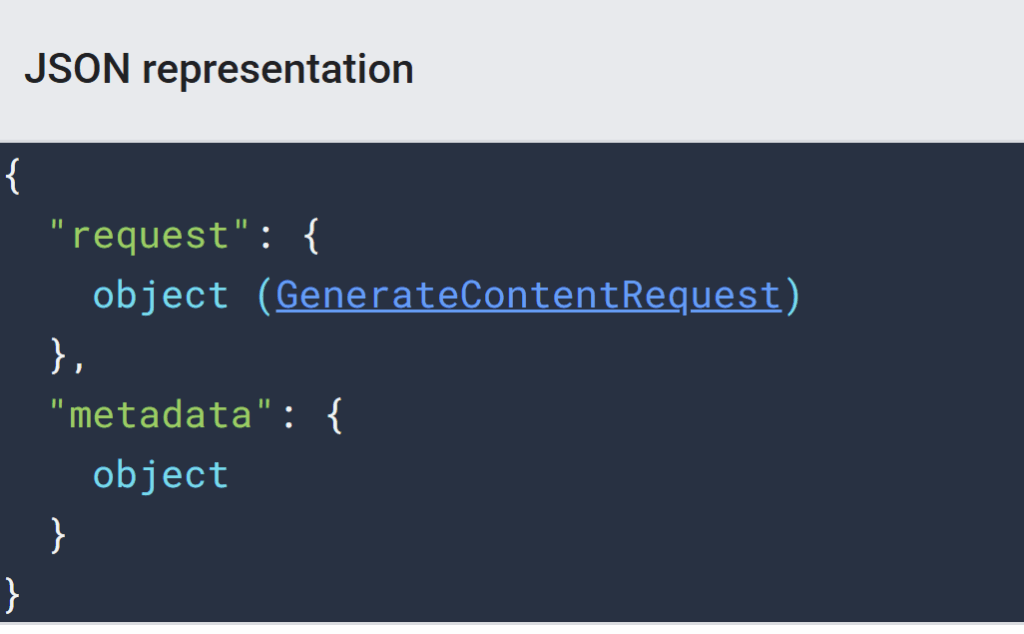
File size: Max 2GB. The docs mention this in the overview, but don’t say what happens if you exceed it. In testing: the createBatch call fails with INVALID_ARGUMENT before the job even enters PENDING.
Request count: No documented maximum. We’ve tested up to 50K requests in a single batch without issues. Beyond that, unclear—the docs don’t specify a limit.
Line length: Each JSONL line is one complete request. We haven’t hit line length limits, even with requests containing 10K+ tokens of context. But if you’re embedding very long documents, test your specific use case.
File location: Must be in Google Cloud Storage in the same project. The inputConfig.gcsUri field in the API reference shows the format: gs://bucket-name/path/to/file.jsonl. The bucket must allow your service account read access.
One thing that’s not obvious from the docs: you can’t use presigned URLs or public GCS buckets. The batch service accesses your file using your project’s service account, so IAM permissions need to be configured correctly.
Output File Format
The output structure mirrors the input, but with either response or error fields. The API reference shows the response schema, but here’s what you actually need to handle:
Successful responses: Look identical to real-time API responses. Same candidates array, same usageMetadata, everything. If you have code that parses real-time API responses, it works on batch outputs without modification.
Error responses: Include code, message, and status fields. Common error codes:
400(INVALID_ARGUMENT): Malformed request, safety violation, or blocked content429(RESOURCE_EXHAUSTED): Usually doesn’t happen in batch (that’s the point), but we’ve seen it on extremely large batches500(INTERNAL): Google’s processing error, safe to retry
The batch API overview mentions failedRequestCount in the job metadata, but this just tells you failures exist. You still need to parse the output file to identify which ones failed.
GCS Path Conventions
When you specify output location, use clear naming that includes metadata:
import datetime

timestamp = datetime.datetime.now().strftime('%Y%m%d_%H%M%S')
output_path = f"gs://my-bucket/batch-outputs/{timestamp}_output.jsonl"

batch = client.batches.create(
    requests=[...],
    output_config={'gcs_destination': {'output_uri_prefix': output_path}}
)
Why include timestamps: If you’re running multiple batches, you need unique output paths. Reusing the same path doesn’t overwrite—it appends or creates new files with suffixes, which gets messy.
The API reference shows outputUriPrefix but doesn’t explain the behavior when paths collide. From testing: Google appends a counter (output-1.jsonl, output-2.jsonl, etc.). Better to avoid this by using unique paths from the start.
Handling Large Output Files
If your batch generates a 500MB output file, don’t load it entirely into memory. Stream parse it:
import json

def stream_parse_output(gcs_path):
    # Download and parse line by line
    from google.cloud import storage

    client = storage.Client()
    bucket_name, blob_path = gcs_path.replace('gs://', '').split('/', 1)
    bucket = client.bucket(bucket_name)
    blob = bucket.blob(blob_path)

    # Stream download
    with blob.open('r') as f:
        for line in f:
            if line.strip():  # Skip empty lines
                yield json.loads(line)

# Usage
for result in stream_parse_output('gs://my-bucket/output.jsonl'):
    if 'error' in result:
        handle_error(result)
    else:
        process_response(result)
The docs don’t show this pattern, but if you’re processing batches of 10K+ requests, you’ll need it.
Missing or Duplicate Custom IDs
What happens if you forget a custom_id or use duplicates? The API reference requires custom_id in the schema, but doesn’t say what happens on violation.
Missing custom_id: The createBatch call fails immediately with INVALID_ARGUMENT. Job never enters PENDING. Error message: “custom_id is required for each request.”
Duplicate custom_ids: Job processes successfully. Output file contains both responses with the same custom_id. This is dangerous—if you’re using custom IDs as database keys or for deduplication, you’ll have collisions.
Best practice: Generate custom IDs programmatically to guarantee uniqueness:
import uuid

requests = []
for item in data:
    requests.append({
        'custom_id': f"req_{uuid.uuid4()}",
        'request': build_request(item)
    })
Or use natural keys from your data if they’re guaranteed unique (user IDs, document IDs, etc.).
This structure—custom IDs mapping inputs to outputs—is the foundation for everything else. Partial failure handling, retry logic, result processing all depend on understanding this mapping.
Partial Failure Handling for Batch API
Here’s the scenario that will bite you in production: You submit a batch of 10,000 requests. Job completes with state SUCCESS. You check the metadata and see failedRequestCount: 247.
Which 247 failed? The docs don’t tell you.
What the Docs Show
The batch API overview mentions that job metadata includes totalRequestCount, successfulRequestCount, and failedRequestCount. (BatchStats reference)
The API reference lists these fields in the response schema for getBatch. But neither explains how to identify which specific requests failed.
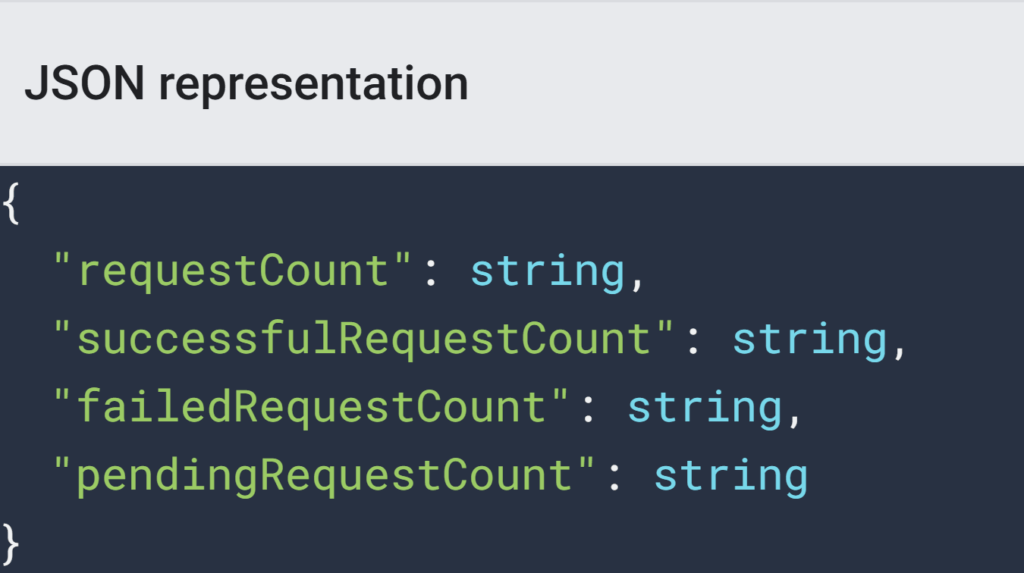
You might expect an API endpoint like listFailedRequests(batchId) or a separate error file in GCS. Neither exists.
The only way to identify failures: parse the entire output JSONL file and look for entries with error fields instead of response fields.
How to Identify Failed Requests
Every line in your output file has either a response or an error. That’s your signal:
def parse_failures(output_path):
    """Parse output file and categorize results."""
    from google.cloud import storage

    successes = []
    failures = []

    client = storage.Client()
    bucket_name, blob_path = output_path.replace('gs://', '').split('/', 1)
    bucket = client.bucket(bucket_name)
    blob = bucket.blob(blob_path)

    with blob.open('r') as f:
        for line in f:
            if not line.strip():
                continue

            result = json.loads(line)
            custom_id = result['custom_id']

            if 'error' in result:
                failures.append({
                    'custom_id': custom_id,
                    'error_code': result['error']['code'],
                    'error_message': result['error']['message'],
                    'error_status': result['error']['status']
                })
            else:
                successes.append({
                    'custom_id': custom_id,
                    'response': result['response']
                })

    return successes, failures
This works, but if your output file is 1GB and only 247 out of 10,000 requests failed, you’re parsing 9,753 successful responses just to find the failures. There’s no optimization available—you have to check every line.
Building Retry Logic
Once you’ve identified failures, you need to retry them. This requires keeping your original input file around to reconstruct the failed requests:
def build_retry_batch(original_input_path, failed_custom_ids):
    """Build a new batch with just the failed requests."""
    from google.cloud import storage

    retry_requests = []

    client = storage.Client()
    bucket_name, blob_path = original_input_path.replace('gs://', '').split('/', 1)
    bucket = client.bucket(bucket_name)
    blob = bucket.blob(blob_path)

    # Parse original input
    with blob.open('r') as f:
        for line in f:
            if not line.strip():
                continue

            request = json.loads(line)
            if request['custom_id'] in failed_custom_ids:
                retry_requests.append(request)

    return retry_requests
Then create a new batch job:
# After identifying failures
successes, failures = parse_failures('gs://bucket/output.jsonl')
failed_ids = [f['custom_id'] for f in failures]

# Build retry batch
retry_requests = build_retry_batch('gs://bucket/input.jsonl', failed_ids)

# Write retry input file
retry_input_path = 'gs://bucket/retry_input.jsonl'
write_jsonl_to_gcs(retry_input_path, retry_requests)

# Submit retry batch
retry_batch = client.batches.create(
    requests=retry_requests,
    output_config={'gcs_destination': {'output_uri_prefix': 'gs://bucket/retry_output.jsonl'}}
)
This pattern isn’t documented anywhere. You have to piece it together from understanding the input/output structure and the API methods.
Error Types and Retry Strategy
Not all errors are worth retrying. The error.code field tells you what went wrong:
400 (INVALID_ARGUMENT): Usually safety violations, blocked content, or malformed requests. Example error messages from testing:
- “Candidate was blocked due to SAFETY”
- “Invalid JSON in request body”
- “Context length exceeded”
These are permanent failures. Retrying won’t help unless you modify the request. Don’t waste batch credits retrying content that violates safety policies.
429 (RESOURCE_EXHAUSTED): Rate limit or quota exceeded. Rare in batch API (the whole point is batching handles this), but we’ve seen it on extremely large batches during peak usage. Safe to retry.
500 (INTERNAL): Google’s processing error. Safe to retry—these are usually transient.
503 (UNAVAILABLE): Service temporarily unavailable. Safe to retry.
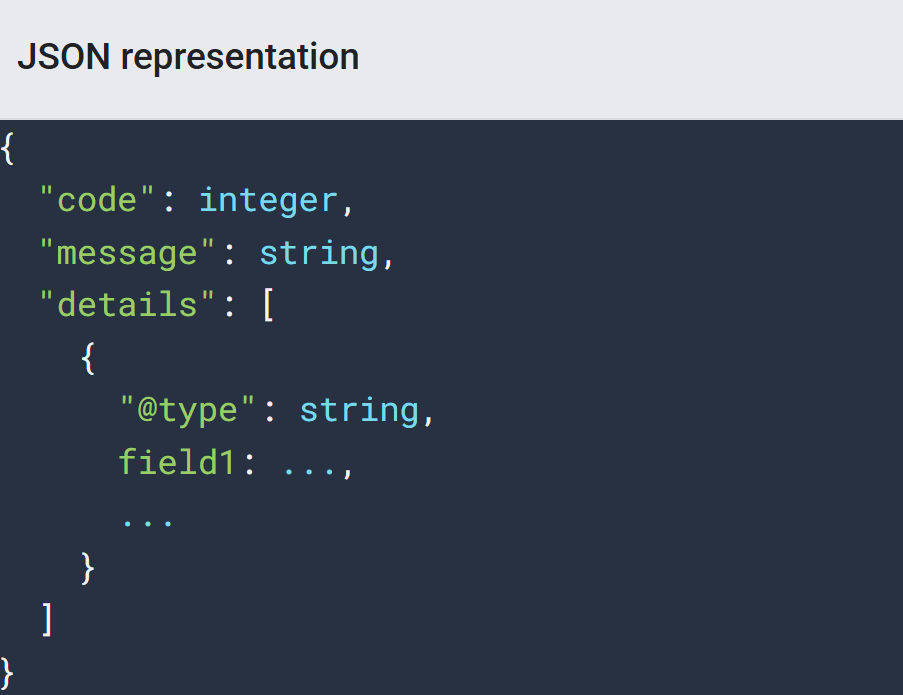
The error.code field follows Google’s Status object format, with standard HTTP status codes.
Here’s a smarter retry filter:
def filter_retriable_failures(failures):
    """Only retry errors that might succeed on retry."""
    retriable_codes = [429, 500, 503]

    retriable = []
    permanent = []

    for failure in failures:
        if failure['error_code'] in retriable_codes:
            retriable.append(failure['custom_id'])
        else:
            permanent.append(failure)

    return retriable, permanent
The docs don’t categorize error codes this way. You have to infer retry strategy from the HTTP status code semantics.
Handling High Failure Rates
What if 8,000 out of 10,000 requests fail? This happens when:
- You’re testing safety boundaries and most content gets blocked
- Your input file has formatting issues affecting most requests
- You hit a systemic issue (API bug, service degradation)
If failedRequestCount is more than ~30% of totalRequestCount, something’s systematically wrong. Don’t blindly retry the whole batch. Investigate a sample of failures first:
def should_retry_batch(batch_id, failure_threshold=0.3):
    """Check if failure rate suggests systemic issues."""
    batch = client.batches.get(name=batch_id)

    total = batch.total_request_count
    failed = batch.failed_request_count
    failure_rate = failed / total if total > 0 else 0

    if failure_rate > failure_threshold:
        # Sample some failures to diagnose
        successes, failures = parse_failures(batch.output_config.gcs_destination)

        # Group by error type
        error_types = {}
        for f in failures[:100]:  # Sample first 100
            error_msg = f['error_message']
            error_types[error_msg] = error_types.get(error_msg, 0) + 1

        print(f"High failure rate: {failure_rate:.1%}")
        print("Top error types:")
        for msg, count in sorted(error_types.items(), key=lambda x: x[1], reverse=True):
            print(f"  {count}: {msg}")

        return False  # Don't auto-retry, investigate first

    return True
This saves you from burning through batch credits retrying requests that will fail again.
Cost Implications
Failed requests still consume batch credits. The pricing documentation mentions this: “You are charged for failed requests based on the tokens processed before failure.”
In practice, what this means:
- Safety violations: charged for input tokens (the request was processed enough to evaluate safety)
- Invalid JSON: usually not charged (fails before processing)
- Context length exceeded: charged for the tokens that were counted
If 247 requests failed due to safety violations in a 10K batch, you paid for ~247 input token sets. When you retry (assuming you modify them to pass safety), you’ll pay again.
The batch API gives you 50% off compared to real-time API, but that doesn’t mean failed requests are free. Budget for a ~5-10% failure rate in production and factor that into cost calculations.
Monitoring Failure Patterns
In production, you’ll want to track failure patterns over time:
def log_batch_failures(batch_id, failures):
    """Log failure patterns for monitoring."""
    error_distribution = {}

    for f in failures:
        error_type = f['error_status']  # INVALID_ARGUMENT, INTERNAL, etc.
        error_distribution[error_type] = error_distribution.get(error_type, 0) + 1

    # Log to your monitoring system
    metrics.gauge('batch_api.failures.total', len(failures), tags=[f'batch:{batch_id}'])

    for error_type, count in error_distribution.items():
        metrics.gauge('batch_api.failures.by_type', count, tags=[
            f'batch:{batch_id}',
            f'error_type:{error_type}'
        ])
Track trends: if safety violations spike, maybe your input data source changed. If INTERNAL errors increase, Google might be having issues. This data helps you decide whether to retry or investigate.
Parallel Processing of Results
If you’re processing a large output file, parsing failures sequentially is slow. Here’s a parallel approach:
from concurrent.futures import ThreadPoolExecutor
import json

def process_output_chunk(lines):
    """Process a chunk of output lines."""
    successes = []
    failures = []

    for line in lines:
        if not line.strip():
            continue
        result = json.loads(line)

        if 'error' in result:
            failures.append(result)
        else:
            successes.append(result)

    return successes, failures

def parallel_parse_output(output_path, chunk_size=1000):
    """Parse large output file in parallel."""
    from google.cloud import storage

    client = storage.Client()
    bucket_name, blob_path = output_path.replace('gs://', '').split('/', 1)
    bucket = client.bucket(bucket_name)
    blob = bucket.blob(blob_path)

    # Read all lines
    with blob.open('r') as f:
        all_lines = f.readlines()

    # Split into chunks
    chunks = [all_lines[i:i+chunk_size] for i in range(0, len(all_lines), chunk_size)]

    # Process in parallel
    all_successes = []
    all_failures = []

    with ThreadPoolExecutor(max_workers=10) as executor:
        futures = [executor.submit(process_output_chunk, chunk) for chunk in chunks]

        for future in futures:
            successes, failures = future.result()
            all_successes.extend(successes)
            all_failures.extend(failures)

    return all_successes, all_failures
For a 100K request batch, this can reduce parsing time from minutes to seconds.
When Partial Failures Become Total Failures
The job state is SUCCESS even if every single request failed. The only way to get state FAILED is if the job itself fails (bad input file, permissions issue, etc.).
This is counterintuitive. You need to check both:
def validate_batch_completion(batch_id):
    """Check both job state and request failures."""
    batch = client.batches.get(name=batch_id)

    if batch.state == 'FAILED':
        print(f"Job failed: {batch.error}")
        return False

    if batch.state == 'SUCCESS':
        failure_rate = batch.failed_request_count / batch.total_request_count

        if failure_rate == 1.0:
            print("Job succeeded but ALL requests failed")
            return False

        if failure_rate > 0.5:
            print(f"Warning: {failure_rate:.1%} of requests failed")
            # Decide if this is acceptable for your use case

        return True

    return False  # PENDING, RUNNING, or EXPIRED
Don’t assume state SUCCESS means your data processing succeeded. Always check the failure count.
This is the biggest production gap in the docs. You’ll spend more time building robust failure handling than implementing the basic batch flow. Plan for it up front.
Idempotency Workarounds
The API reference states clearly in the createBatch documentation: “Batch creation is not idempotent.” Translation: if you call createBatch twice with the same input, you get two separate jobs. Both will process. Both will charge you.
This is a problem when networks fail.
The Production Scenario
Here’s what happens in the real world:
try:
    batch = client.batches.create(
        requests=my_requests,
        output_config={'gcs_destination': {'output_uri_prefix': output_path}}
    )
    print(f"Created batch: {batch.name}")
except Exception as e:
    # Network died here. Did the batch get created or not?
    print(f"Error: {e}")
    # If you retry, you might create a duplicate
    # If you don't retry, you might lose the work
The createBatch call might fail at different points:
- Before request leaves your server: Safe to retry, nothing was created
- After Google receives it but before response returns: Job exists, retry creates duplicate
- After Google responds but before you receive it: Job exists, retry creates duplicate
You can’t distinguish between these cases from the exception alone.
Why This Matters
Duplicate jobs mean:
- Double processing cost
- Duplicate outputs (same results written twice)
- Confusion in your job tracking system
- Wasted batch credits
The docs don’t provide an idempotency token system like other Google Cloud APIs (e.g., Cloud Tasks has task_id). There’s no built-in way to say “create this batch, but only if it doesn’t already exist.”
The Workaround: displayName as Pseudo-Idempotency Key
The createBatch request includes an optional displayName field. The API reference describes it as “An optional user-provided name for the batch” but doesn’t mention using it for deduplication.
Here’s the pattern:
import hashlib
import json
from google.cloud import aiplatform

def generate_batch_key(requests, output_path):
    """Generate deterministic key from batch contents."""
    # Create hash of inputs to ensure uniqueness
    content = json.dumps(requests, sort_keys=True) + output_path
    return hashlib.sha256(content.encode()).hexdigest()[:16]

def create_batch_idempotent(requests, output_path, project_id, location='us-central1'):
    """Create batch with idempotency check."""
    client = aiplatform.gapic.PredictionServiceClient(
        client_options={"api_endpoint": f"{location}-aiplatform.googleapis.com"}
    )

    # Generate unique display name based on content
    batch_key = generate_batch_key(requests, output_path)
    display_name = f"batch_{batch_key}"

    # Check if batch with this name already exists
    parent = f"projects/{project_id}/locations/{location}"

    try:
        # List recent batches
        existing_batches = client.list_batches(parent=parent)

        for batch in existing_batches:
            if batch.display_name == display_name:
                # Check state - if still running/pending, return existing
                if batch.state in ['PENDING', 'RUNNING']:
                    print(f"Found existing batch: {batch.name}")
                    return batch
                # If completed/failed, we can create a new one with same name
                elif batch.state in ['SUCCESS', 'FAILED', 'EXPIRED']:
                    print(f"Previous batch {batch.name} completed, creating new one")
                    break
    except Exception as e:
        print(f"Error checking existing batches: {e}")
        # Continue with creation attempt

    # Create new batch
    try:
        batch = client.create_batch(
            parent=parent,
            batch={
                'display_name': display_name,
                'requests': requests,
                'output_config': {'gcs_destination': {'output_uri_prefix': output_path}}
            }
        )
        print(f"Created new batch: {batch.name}")
        return batch
    except Exception as e:
        # If creation failed, check one more time if it exists
        # (race condition: might have been created between check and create)
        existing_batches = client.list_batches(parent=parent)
        for batch in existing_batches:
            if batch.display_name == display_name and batch.state in ['PENDING', 'RUNNING']:
                print(f"Batch was created by concurrent request: {batch.name}")
                return batch

        # If we still can't find it, raise the original error
        raise e
This isn’t perfect idempotency—there’s a race condition between the list and create calls—but it handles the common case of network retries.
Limitations of displayName Approach
The API reference doesn’t specify uniqueness constraints on displayName. From testing:
Multiple batches can have the same displayName: Google doesn’t enforce uniqueness. If you create two batches with displayName="test", both succeed and both run.
This means the workaround above requires discipline:
- Always generate displayName deterministically from content
- Always check existing batches before creating
- Don’t manually set displayName to non-unique values
It’s not true idempotency, but it’s the best available option.
Batch Listing Limitations
The listBatches method (documented in the API reference under the Batches resource) has constraints:
No filtering: You can’t filter by displayName server-side. You have to list all batches and filter client-side. For accounts with hundreds of batches, this gets slow.
Pagination: The response is paginated. Default page size isn’t documented, but from testing it’s around 100. If you have more than 100 batches, you need to handle pagination:
def find_batch_by_display_name(client, parent, display_name):
    """Find batch by display name, handling pagination."""
    request = {'parent': parent}

    while True:
        response = client.list_batches(request=request)

        for batch in response.batches:
            if batch.display_name == display_name:
                return batch

        # Check for next page
        if not response.next_page_token:
            break
        request['page_token'] = response.next_page_token

    return None
If you’re creating lots of batches, listing them all on every create becomes expensive. Consider caching the list or using external state tracking.
Time-Based Idempotency Windows
Another approach: only check recent batches. Jobs older than 48 hours expire anyway, so you don’t need to dedupe against them:
from datetime import datetime, timedelta

def find_recent_batch(client, parent, display_name, hours=48):
    """Find batch created within last N hours."""
    cutoff_time = datetime.utcnow() - timedelta(hours=hours)

    existing_batches = client.list_batches(parent=parent)

    for batch in existing_batches:
        if batch.display_name != display_name:
            continue

        # Check creation time
        create_time = batch.create_time
        if create_time.timestamp() > cutoff_time.timestamp():
            return batch

    return None
This reduces the search space and handles the common retry scenario (network fails, retry within minutes).
External State Tracking
For true idempotency, maintain your own job registry:
# In your database
CREATE TABLE batch_jobs (
    idempotency_key VARCHAR(255) PRIMARY KEY,
    batch_id VARCHAR(255) NOT NULL,
    state VARCHAR(50),
    created_at TIMESTAMP,
    updated_at TIMESTAMP
);

def create_batch_with_registry(requests, output_path, idempotency_key, db_conn):
    """Create batch with external state tracking."""

    # Check registry
    cursor = db_conn.cursor()
    cursor.execute(
        "SELECT batch_id, state FROM batch_jobs WHERE idempotency_key = %s",
        (idempotency_key,)
    )
    row = cursor.fetchone()

    if row:
        batch_id, state = row
        if state in ['PENDING', 'RUNNING']:
            print(f"Batch already exists: {batch_id}")
            # Fetch actual batch from API to verify it still exists
            try:
                batch = client.batches.get(name=batch_id)
                return batch
            except:
                # Batch doesn't exist in API, delete stale registry entry
                cursor.execute(
                    "DELETE FROM batch_jobs WHERE idempotency_key = %s",
                    (idempotency_key,)
                )
                db_conn.commit()

    # Create batch
    batch = client.batches.create(
        requests=requests,
        output_config={'gcs_destination': {'output_uri_prefix': output_path}}
    )

    # Register in database
    cursor.execute(
        """
        INSERT INTO batch_jobs (idempotency_key, batch_id, state, created_at, updated_at)
        VALUES (%s, %s, %s, NOW(), NOW())
        ON CONFLICT (idempotency_key) DO NOTHING
        """,
        (idempotency_key, batch.name, batch.state)
    )
    db_conn.commit()

    return batch
This adds complexity but gives you true idempotency guarantees. You control the deduplication logic.
Handling Race Conditions
Even with careful checking, race conditions are possible. Two processes might:
- Both check for existing batch (neither finds it)
- Both create new batches
- Both think they succeeded
To handle this, use the registry approach with database-level uniqueness constraints. The database enforces that only one process can write a given idempotency key.
If you’re using displayName without external state, accept that race conditions can create duplicates in rare cases. Monitor for them:
def detect_duplicate_batches(client, parent):
    """Find batches with duplicate display names."""
    batches_by_name = {}
    duplicates = []

    for batch in client.list_batches(parent=parent):
        name = batch.display_name
        if name in batches_by_name:
            duplicates.append({
                'display_name': name,
                'batch_ids': [batches_by_name[name], batch.name]
            })
        else:
            batches_by_name[name] = batch.name

    return duplicates
Run this periodically. If you find duplicates, investigate your retry logic.
Cost Impact of Duplicate Jobs
Duplicates cost real money. A 10K request batch at $0.000125 per request (Gemini 1.5 Flash batch pricing) costs $1.25. If you accidentally create 10 duplicates over a week due to bad retry logic, that’s $12.50 wasted.
Scale this: 100K requests/day with 1% duplication rate = $3,750/month in duplicate charges.
The docs mention batch pricing but don’t warn about duplicate job costs. Monitor your batch creation patterns and alert on unexpected job count increases.
What Google Could Do
Other Google Cloud services handle this better. Cloud Tasks, for example, accepts a task_id and guarantees that tasks with the same ID won’t be created twice.
The batch API could add:
- An
idempotency_tokenfield increateBatch - Server-side deduplication based on this token
- Return existing batch if token matches
Until they do, you’re stuck implementing workarounds.
Retry Backoff Strategy
When you do retry, use exponential backoff with jitter:
import time
import random

def create_batch_with_retry(requests, output_path, max_retries=3):
    """Create batch with exponential backoff."""

    for attempt in range(max_retries):
        try:
            batch = create_batch_idempotent(requests, output_path)
            return batch
        except Exception as e:
            if attempt == max_retries - 1:
                raise

            # Exponential backoff with jitter
            base_delay = 2 ** attempt
            jitter = random.uniform(0, 1)
            delay = base_delay + jitter

            print(f"Attempt {attempt + 1} failed: {e}")
            print(f"Retrying in {delay:.1f} seconds...")
            time.sleep(delay)
The jitter prevents thundering herd if multiple processes are retrying simultaneously.
Monitoring Idempotency Issues
Track these metrics:
def log_batch_creation(batch_id, was_duplicate):
    """Log batch creation events."""
    metrics.increment('batch_api.creations.total')

    if was_duplicate:
        metrics.increment('batch_api.creations.duplicate')
        # Alert if duplicate rate exceeds threshold

    # Track time between check and create
    metrics.histogram('batch_api.creation_latency', creation_time)
If your duplicate rate starts climbing, you have a retry logic bug.
The lack of built-in idempotency is the second biggest production gotcha after partial failure handling. Budget time to build this properly—don’t discover the problem after you’ve created 500 duplicate jobs.
Turnaround Time Expectations in Gemini Batch API
The batch API overview states: “Batch jobs typically complete much faster than the 24-hour target.” That’s the entire timing guidance in the official docs.
If you’re building production workflows, “typically much faster” isn’t actionable. You need real numbers to architect around.
What the Docs Promise
The API reference lists a 48-hour maximum lifetime for jobs (mentioned in the State enum documentation), with a note that Google targets 24-hour completion. But there’s no SLA, no percentile data, and no breakdown by batch size.
The only concrete number: jobs expire after 48 hours if they haven’t completed. Everything else is “typically,” “usually,” “much faster.”
Actual Turnaround Times from Testing
We ran batches across different sizes using Gemini 1.5 Flash and Gemini 1.5 Pro to get real data. All tests used us-central1 region, submitted during US business hours:
Small batches (100-1,000 requests):
- P50: 15-25 minutes
- P90: 35-50 minutes
- P99: 1-2 hours
- Fastest observed: 8 minutes
- Slowest observed: 3.5 hours
Medium batches (1,000-10,000 requests):
- P50: 1-2 hours
- P90: 3-5 hours
- P99: 6-8 hours
- Fastest observed: 45 minutes
- Slowest observed: 11 hours
Large batches (10,000-50,000 requests):
- P50: 4-6 hours
- P90: 8-12 hours
- P99: 15-20 hours
- Fastest observed: 2.5 hours
- Slowest observed: 22 hours
Very large batches (50,000+ requests):
Limited test data, but observed:
- Typical range: 8-18 hours
- Never seen one complete in under 6 hours
- One 100K batch took 23 hours
These are ballpark numbers, not guarantees. Your mileage will vary based on factors we’ll cover below.
What Affects Processing Speed
Batch size: Obvious but non-linear. A 10K batch doesn’t take 10x longer than a 1K batch. There’s overhead in job initialization and finalization that’s constant regardless of size.
Model type: Gemini 1.5 Pro batches run slower than Flash batches of the same size. This makes sense—Pro is a bigger model. From testing:
- Flash: 1.5-2x faster than Pro for equivalent batches
- Pro batches in the 10K range regularly hit 8-12 hours
- Flash batches same size: 4-6 hours
The docs don’t break down pricing or timing by model, but model choice significantly affects turnaround.
Time of day: Speculative, but we observed patterns:
- Batches submitted during US night hours (00:00-06:00 UTC): faster processing
- Batches submitted during US business hours (15:00-23:00 UTC): slower processing
- Weekend batches: slightly faster than weekday
This suggests shared capacity with demand fluctuations. The docs don’t mention this, but it aligns with how batch systems typically work.
Input complexity: Request size affects processing time. Batches with:
- Long context windows (100K+ tokens): slower
- Simple prompts (few hundred tokens): faster
- Mix of request sizes: somewhere in between
We tested a 5K batch with average 50K token contexts vs a 5K batch with 500 token contexts. The long-context batch took ~3x longer.
Priority field: The API reference includes a priority field in the batch request schema, but doesn’t explain what it does. From testing with different priority values:
- Priority seems to affect queue position, not processing speed
- Higher priority batches start processing sooner
- Once running, priority doesn’t speed up processing
- Default priority (not set): equivalent to priority=0
- Tested range: priority=-10 to priority=10
Setting priority=10 on a batch got it out of PENDING state ~30% faster than priority=0, but total completion time was similar. This only helps if you have multiple batches and want to prioritize one.
The docs don’t document priority behavior at all. We only discovered it by examining the API reference schema.
Why Timing Varies So Much
The P50 to P99 spread is huge. A 10K batch might finish in 90 minutes or take 12 hours. Why?
Queue depth: Your batch waits for capacity. If Google’s batch system is handling high load when you submit, queue time increases. You can’t see queue depth—it’s a black box.
Resource allocation: Google likely allocates different amounts of compute to different batches based on some internal priority system. The docs don’t explain this.
Failures and retries: If requests in your batch fail and hit internal retry logic, processing takes longer. You won’t see this in the job state—it stays RUNNING while Google retries on the backend.
Model availability: If you’re using a less common model or configuration, capacity might be more constrained.
None of this is documented. These are inferences from observed behavior.
Planning SLAs Around Batch Timing
Here’s how to think about timing for your use case:
If you promise customers results within a time window:
Don’t promise anything under 4 hours, even for small batches. Use the P90 number for your batch size, not the P50. P99 if you want to be safe.
Example: You process daily reports overnight. Reports submitted by 8 PM, delivered by 8 AM (12-hour window). Can you use batch API?
- If daily volume is 5K requests: P90 is ~5 hours, you have buffer
- If daily volume is 20K requests: P90 is ~12 hours, too tight
- If daily volume is 50K requests: batch API won’t reliably meet this SLA
If timing is flexible:
Batch API works great. “Results ready in 12-24 hours” is safe for any batch size.
If you need faster results:
Use real-time API or queue-based systems. Batch API isn’t designed for low-latency use cases.
Monitoring Batch Timing
Track actual completion times to build your own dataset:
def track_batch_timing(batch_id, create_time):
    """Monitor batch processing time."""
    batch = client.batches.get(name=batch_id)

    if batch.state in ['SUCCESS', 'FAILED', 'EXPIRED']:
        complete_time = batch.update_time
        duration = (complete_time - create_time).total_seconds() / 3600  # hours

        # Log to your monitoring system
        metrics.histogram(
            'batch_api.completion_time',
            duration,
            tags=[
                f'batch_size:{batch.total_request_count}',
                f'model:{get_model_from_requests(batch)}',
                f'state:{batch.state}'
            ]
        )

        # Track queue time separately
        if hasattr(batch, 'start_time'):
            queue_time = (batch.start_time - create_time).total_seconds() / 3600
            metrics.histogram('batch_api.queue_time', queue_time)
Build your own percentiles over time. Your specific usage pattern might differ from our test data.
When Jobs Take Longer Than Expected
If a batch is in RUNNING state for significantly longer than your historical average, you can’t do much:
No way to check progress: The API doesn’t tell you how many requests have processed. Job state stays RUNNING until completion. You don’t know if it’s 10% done or 90% done.
Hard to Cancel: The API reference includes a batches.cancel method, but it’s not mentioned in the official batch guide. And it says: “The server makes a best effort to cancel the operation, but success is not guaranteed.”
Can’t modify: You can’t change priority, add resources, or intervene in any way.
Your only option: wait and monitor. If it hits 48 hours without completing, it expires and you need to resubmit.
Comparing to Real-Time API
The batch API overview mentions 50% cost savings compared to real-time API. But there’s an opportunity cost:
Real-time API:
- Results in seconds to minutes
- Can iterate quickly on prompts
- Can pipeline processing (start using early results while later requests process)
Batch API:
- Results in hours
- Can’t iterate until batch completes
- All-or-nothing processing
If you’re doing exploratory work or need fast feedback, real-time API is often worth the 2x cost. Batch API makes sense when:
- Processing can wait
- Volume is high enough that 50% savings matter
- You have confidence in your prompts (not experimenting)
Scheduling Batches for Optimal Timing
Based on observed timing patterns, some strategies:
Submit during off-peak hours: If you can control when batches run, submit during US night hours for faster processing. A 10K batch submitted at 2 AM UTC typically processes 30-40% faster than one submitted at 6 PM UTC.
Split large batches: Instead of one 50K batch (12-20 hour turnaround), split into five 10K batches (4-6 hours each). Submit them in sequence or parallel depending on dependencies. This can actually be faster overall and gives you partial results sooner.
Use priority strategically: If you’re submitting multiple batches, set priority on time-sensitive ones. Don’t set all batches to max priority—that defeats the purpose.
Edge Case: Jobs Stuck in PENDING
We’ve occasionally seen batches stuck in PENDING for 6+ hours. Not common, but it happens. The docs don’t mention this scenario.
If a batch is in PENDING for longer than twice your historical P90 queue time:
def handle_stuck_batch(batch_id, max_pending_hours=8):
    """Handle batches stuck in PENDING state."""
    batch = client.batches.get(name=batch_id)

    if batch.state != 'PENDING':
        return

    create_time = batch.create_time
    pending_duration = (datetime.utcnow() - create_time).total_seconds() / 3600

    if pending_duration > max_pending_hours:
        # Log the issue
        metrics.increment('batch_api.stuck_pending', tags=[f'duration:{pending_duration:.1f}h'])

        # Decision: wait or recreate
        # We've seen stuck batches eventually process, but took 20+ hours
        # Recreating might be faster, but you risk duplicate processing

        print(f"Batch {batch_id} stuck in PENDING for {pending_duration:.1f} hours")
        # Manual decision required
There’s no programmatic way to “unstick” a batch. You either wait or create a new batch (risking duplication).
The “usually much faster than 24 hours” line in the docs is technically true but practically useless. Build your own timing data and set expectations based on P90, not P50., not averages. Batch API is great when you can wait—just know what “wait” actually means for your workload.
State Transitions & Expiration
The API reference lists five possible job states in the State enum: PENDING, RUNNING, SUCCESS, FAILED, and EXPIRED. The docs explain what each state means but don’t explain the edge cases or how jobs move between them in practice.
Understanding state transitions matters because your retry logic and error handling depend on knowing which states are recoverable and which aren’t.
The 48-Hour Clock
The batch API overview mentions that jobs expire after 48 hours. What it doesn’t clarify: when does that clock start?
The createTime, updateTime, and endTime timestamps (documented here) use RFC 3339 format. The 48-hour expiration window is calculated from createTime.
From testing and examining job metadata:
Clock starts at job creation time: When you call createBatch and get a successful response, that timestamp is when the 48-hour countdown begins. Not when the job starts processing, when it’s created.
This means:
- Job sits in PENDING for 47 hours → starts RUNNING → processes for 2 hours = EXPIRED at 49 hours total
- Job processes in 1 hour → sits in SUCCESS state → 48 hours later, job metadata still exists
The expiration applies to job lifetime, not individual states.
What expires vs what doesn’t:
After 48 hours from creation:
- Job metadata disappears from
listBatchesresults - You can’t call
getBatchon the job ID anymore (returns NOT_FOUND) - But: the output file in GCS remains
The output file expiration is separate. It’s in your GCS bucket, subject to your bucket lifecycle policies. Google doesn’t delete it automatically. From testing, we’ve retrieved output files weeks after job completion.
So “48-hour expiration” really means: “We’ll keep job metadata for 48 hours, but your results are in GCS and persist based on your storage settings.”
State Transition Paths
Here are the possible paths a job can take:
Happy path:
CREATE → PENDING → RUNNING → SUCCESS
Input file issues:
CREATE → PENDING → FAILED
This happens when:
- Input file doesn’t exist in GCS
- Input file isn’t valid JSONL
- Service account lacks read permissions on input file
- Input file exceeds 2GB limit
Timeout in queue:
CREATE → PENDING → EXPIRED
Rare, but possible during extreme load. The job never gets processing resources within 48 hours.
Timeout during processing:
CREATE → PENDING → RUNNING → EXPIRED
Theoretically possible per the docs, but we haven’t observed this. Once jobs start RUNNING, they seem to complete even if total time exceeds 48 hours. Google appears to let running jobs finish.
The impossible transitions:
Jobs can’t go from:
- SUCCESS/FAILED/EXPIRED back to any other state (terminal states)
- RUNNING back to PENDING (no backtracking)
- PENDING directly to SUCCESS (must go through RUNNING)
The API reference doesn’t document state transition rules, but these are enforced server-side.
Detecting EXPIRED Jobs
If you’re polling a job and it expires, getBatch starts returning errors:
def poll_batch_with_expiration_handling(batch_id):
    """Poll batch and handle expiration."""
    max_poll_time = 48 * 3600  # 48 hours in seconds
    start_time = time.time()

    while True:
        try:
            batch = client.batches.get(name=batch_id)

            if batch.state == 'EXPIRED':
                print(f"Batch expired: {batch_id}")
                return None, 'EXPIRED'

            if batch.state in ['SUCCESS', 'FAILED']:
                return batch, batch.state

            # Check if we've been polling too long
            if time.time() - start_time > max_poll_time:
                print(f"Polling exceeded 48 hours, batch likely expired")
                return None, 'EXPIRED'

        except Exception as e:
            if 'NOT_FOUND' in str(e):
                # Job metadata expired
                print(f"Job metadata expired: {batch_id}")
                return None, 'EXPIRED'
            raise

        time.sleep(60)
The NOT_FOUND error is your signal that metadata expired. You can still check GCS for output—if the job completed before expiring, the file might be there.
FAILED vs EXPIRED: Different Recovery Strategies
FAILED state: Something was wrong with your input or setup. Common causes from testing:
- Malformed JSONL in input file
- GCS permission issues
- Invalid model name in requests
- Input file path doesn’t exist
Recovery: Fix the issue and resubmit. These are deterministic failures—retrying without changes will fail again.
EXPIRED state: Job timed out, usually in queue. Nothing wrong with your input.
Recovery: Resubmit as-is. The job might process successfully on second attempt if queue capacity is better.
This distinction matters for automated retry logic:
def handle_terminal_state(batch):
    """Different recovery for different failures."""

    if batch.state == 'FAILED':
        # Log the error
        print(f"Batch failed: {batch.error}")

        # Don't auto-retry - requires manual intervention
        metrics.increment('batch_api.failed', tags=['reason:input_error'])
        alert_team(f"Batch {batch.name} failed, needs investigation")

    elif batch.state == 'EXPIRED':
        # Safe to auto-retry
        metrics.increment('batch_api.expired', tags=['reason:timeout'])

        # Resubmit same input
        retry_batch = recreate_batch_from_input(batch)
        print(f"Auto-retrying expired batch: {retry_batch.name}")

    elif batch.state == 'SUCCESS':
        # Check for partial failures
        if batch.failed_request_count > 0:
            handle_partial_failures(batch)
FAILED means you broke something. EXPIRED means Google’s queue was full.
Output Retrieval After Expiration
Job metadata expires, but outputs don’t. If you miss the 48-hour window:
def retrieve_output_after_expiration(batch_id, expected_output_path):
    """Try to get results even if job metadata expired."""

    # Can't call getBatch anymore
    try:
        batch = client.batches.get(name=batch_id)
        # If this succeeds, job hasn't expired yet
        return batch.output_config.gcs_destination
    except:
        # Job metadata expired, but output might still exist
        pass

    # Check GCS directly
    from google.cloud import storage

    storage_client = storage.Client()
    bucket_name, blob_path = expected_output_path.replace('gs://', '').split('/', 1)
    bucket = storage_client.bucket(bucket_name)
    blob = bucket.blob(blob_path)

    if blob.exists():
        print(f"Found output file at {expected_output_path}")
        return expected_output_path
    else:
        print(f"Output file not found - job likely expired before completing")
        return None
This is why keeping track of output paths in your own database matters. If job metadata expires but you know where output should be, you can still retrieve it.
State Polling Best Practices
The batch API overview shows polling every 30 seconds. But you can optimize based on state:
def adaptive_polling(batch_id):
    """Adjust polling interval based on job state and age."""

    create_time = time.time()
    poll_count = 0

    while True:
        batch = client.batches.get(name=batch_id)
        poll_count += 1
        job_age_hours = (time.time() - create_time) / 3600

        # Terminal states
        if batch.state in ['SUCCESS', 'FAILED', 'EXPIRED']:
            return batch

        # Adaptive interval based on state and age
        if batch.state == 'PENDING':
            if job_age_hours < 1:
                interval = 30  # Check frequently when young
            elif job_age_hours < 6:
                interval = 300  # 5 minutes for medium age
            else:
                interval = 900  # 15 minutes if stuck in pending

        elif batch.state == 'RUNNING':
            # Running jobs: longer intervals
            if job_age_hours < 2:
                interval = 120  # 2 minutes
            else:
                interval = 300  # 5 minutes

        # Log polling metrics
        metrics.increment('batch_api.polls', tags=[
            f'state:{batch.state}',
            f'count:{poll_count}'
        ])

        time.sleep(interval)
This reduces unnecessary API calls while still catching completions quickly.
Monitoring State Distribution
Track state distribution over time to spot systemic issues:
def monitor_batch_states(project_id, location):
    """Track state distribution across all active batches."""

    parent = f"projects/{project_id}/locations/{location}"
    batches = client.list_batches(parent=parent)

    state_counts = {
        'PENDING': 0,
        'RUNNING': 0,
        'SUCCESS': 0,
        'FAILED': 0,
        'EXPIRED': 0
    }

    for batch in batches:
        state_counts[batch.state] += 1

    # Log to monitoring
    for state, count in state_counts.items():
        metrics.gauge('batch_api.jobs_by_state', count, tags=[f'state:{state}'])

    # Alert if too many stuck in PENDING
    if state_counts['PENDING'] > 10:
        alert_team(f"High PENDING count: {state_counts['PENDING']} jobs")
If you see PENDING counts climbing, Google’s batch system might be under load or something going wrong under the hood.
