Google has just unveiled its most ambitious search experience yet: AI Mode, powered by the advanced Gemini 2.5 model. The feature transforms how we interact with search, offering a conversational, intelligent, and deeply personalized way to find information. If you’ve been wondering what AI Mode can do and how to get a taste of it, this post covers everything you need to know.
What is Google AI Mode?
AI Mode represents Google’s most powerful AI search experience to date. Unlike traditional search that returns a list of links, AI Mode provides comprehensive, AI-powered responses to your questions while maintaining the ability to explore deeper through follow-up questions and curated web links. Think of it as having a knowledgeable research assistant that can understand complex queries, reason through problems, and present information in an intuitive, organized manner.
The feature leverages Gemini 2.5’s advanced reasoning, thinking, and multimodal capabilities to tackle even the most challenging questions. What sets AI Mode apart is its “query fan-out” technique, which intelligently divides complex questions into subtopics and searches for each simultaneously across multiple data sources before synthesizing a comprehensive response.
Core Features of Google AI Mode
1. Advanced Conversational Search
AI Mode excels at handling complex, multi-part questions that would typically require several separate searches. Whether you’re trying to understand a new concept, seeking specific recommendations, or comparing different products, you can ask your question naturally and receive a well-structured, comprehensive response.
The system understands context and nuance, allowing you to ask questions like “What are the best sustainable investment options for someone in their 30s with moderate risk tolerance?” and receive a detailed response that addresses all aspects of your query.
2. Multimodal Input Capabilities
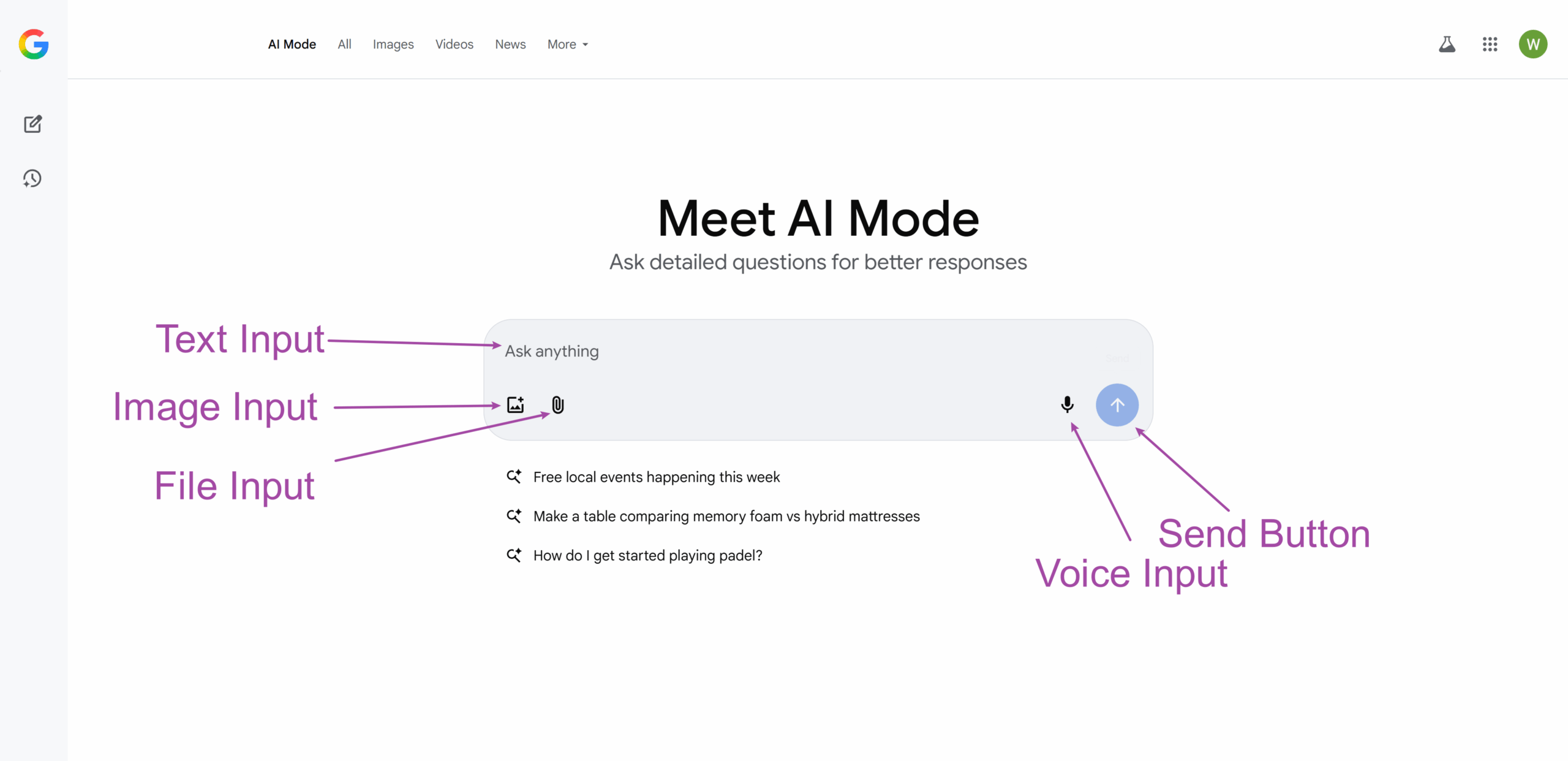
One of AI Mode’s standout features is its ability to process information through multiple input methods:
- Text Input: Type your questions naturally using conversational language
- Voice Input: Speak your questions aloud using the microphone feature
- Image Input: Upload photos or take pictures to ask visual questions
- Lens Integration: Use Google Lens to analyze images and ask related questions
This flexibility means you can interact with AI Mode in whatever way feels most natural for your situation, whether you’re typing at a desk, speaking while driving, or capturing something visual you want to understand better.
3. Follow-up Question System
AI Mode maintains context throughout your conversation, allowing for natural follow-up questions. You can dig deeper into topics, change direction, or ask for clarification without having to restate your original question. This creates a fluid research experience where each question builds upon the previous interaction.
For example, after asking about sustainable investments, you might follow up with “What about ESG funds specifically?” or “How do these compare to traditional index funds?” The system remembers your context and provides relevant responses.
4. Deep Search Capability
For questions requiring extensive research, AI Mode offers Deep Search, its most advanced research tool. Built with the Gemini 2.5 Pro model, Deep Search browses hundreds of websites, reasons across multiple sources, and crafts comprehensive, fully-cited reports in minutes.
Deep Search is particularly valuable for:
- Complex research topics requiring multiple perspectives
- Academic or professional research needs
- Comparative analysis across multiple sources
- In-depth exploration of specialized subjects
This feature is available to Google AI subscribers in Labs and represents the cutting edge of AI-powered research capabilities.
5. Intelligent Information Organization
AI Mode doesn’t just provide answers; it organizes information in a logical, easy-to-understand format. The system automatically structures responses with clear headings, relevant details, and supporting links, making complex information digestible and actionable.
6. Source Integration and Verification
Every AI Mode response includes high-quality web links from authoritative sources. This integration serves multiple purposes:
- Allows users to verify information
- Provides additional perspectives on topics
- Enables deeper exploration of specific aspects
- Maintains transparency about information sources
The system prioritizes reputable sources and provides diverse viewpoints to ensure users receive well-rounded information.
7. Personalized Responses
For users opted into the AI Mode experiment in Search Labs, the system offers personalized responses based on your search history, preferences, and past interactions. This personalization helps tailor suggestions to your interests while maintaining privacy and user control.
Personalization features include:
- Customized recommendations based on past searches
- Location-aware suggestions when relevant
- Preference learning from user feedback
- Adaptive response styles based on user interaction patterns
8. Search History and Continuity
AI Mode maintains a searchable history of your interactions, allowing you to:
- Pick up previous conversations where you left off
- Review past research sessions
- Build upon earlier queries
- Maintain research continuity across sessions
This feature requires Web & App Activity to be enabled and provides a seamless research experience across multiple sessions.
How to Access Google AI Mode
Getting started with AI Mode is straightforward, with multiple access points available:
Method 1: Direct URL Access
Navigate directly to google.com/ai to access AI Mode immediately.
Method 2: Traditional Search Integration
Visit www.google.com, enter your question in the search bar, and tap the “AI Mode” option that appears.
Method 3: Google App Access
In the Google mobile app, tap “AI Mode” directly from the home screen.
Search Labs Access
For experimental features and advanced capabilities, opt into the “AI Mode” experiment in Search Labs. This provides early access to cutting-edge features and improvements.
Availability and Language Support
AI Mode is currently available in 180+ countries and supports seven languages:
- English
- Hindi
- Indonesian
- Japanese
- Korean
- Portuguese (Brazil)
- Spanish
The service continues to expand to new regions and languages, with Google working to make AI Mode globally accessible.
How to Use AI Mode Effectively
They have an official page dedicated to the tips and tricks, you can find it here. But in general, you should keep in mind of the following rules:
Text-Based Queries
For text input, simply type your question into the “Ask anything” bar at the bottom of the screen. AI Mode works best with:
- Specific, detailed questions
- Natural conversational language
- Context-rich queries that would typically require multiple searches
- Comparative questions asking for analysis between options
Voice Interactions
To use voice input:
- Tap the microphone icon in the “Ask anything” bar
- Speak your question clearly
- Wait for the transcription and processing
- Ask follow-up questions using the same method
Voice queries are particularly useful when multitasking or when typing isn’t convenient.
Image-Based Questions
For visual queries:
- Tap the Lens icon in the search bar
- Upload an existing image or take a new photo
- Ask questions about what you see
- Follow up with additional text or voice queries
This feature excels at identifying objects, explaining visual concepts, reading text in images, and providing context about visual information.
Advanced AI Mode Features
Premium Model Access with Gemini 2.5 Pro
Subscribers to Google AI Pro and AI Ultra gain access to significantly enhanced capabilities through Gemini 2.5 Pro integration. This premium model demonstrates exceptional performance in specialized areas that demand sophisticated computational thinking. Mathematical reasoning becomes more precise and thorough, allowing users to work through complex equations, statistical analysis, and quantitative problems with detailed step-by-step explanations. The system excels particularly when handling intricate coding questions, offering not just solutions but comprehensive explanations of logic, syntax, and best practices across multiple programming languages.
The advanced reasoning capabilities extend to sophisticated logical analysis, where the AI can navigate complex arguments, identify logical fallacies, and construct coherent reasoning chains for multifaceted problems. Multi-step problem solving represents perhaps the most impressive advancement, as the system can break down complex challenges into manageable components, work through each systematically, and synthesize solutions that account for interdependencies and constraints.
Experimental Agentic Capabilities
Google AI Ultra subscribers gain early access to groundbreaking agentic capabilities that transform AI Mode from a search tool into an active task completion assistant. These experimental features represent a significant leap toward AI systems that can take action on behalf of users rather than simply providing information.
Restaurant reservation finding exemplifies this capability, where users can specify complex criteria including date preferences, location constraints, dietary requirements, party size, and ambiance preferences. The system actively searches across multiple platforms and presents viable options with booking links. Itinerary planning becomes similarly sophisticated, with AI Mode coordinating flights, accommodations, activities, and transportation while considering budget constraints, travel preferences, and timing requirements.
The system excels at coordinating multiple requirements simultaneously, managing the complexity that typically requires extensive manual research and comparison. Multi-step research tasks become streamlined processes where AI Mode can gather information from diverse sources, synthesize findings, and present actionable recommendations based on user-specified criteria.
Personalization and Control Systems
AI Mode provides comprehensive personalization controls that balance customized experiences with user privacy. The search personalization settings within Google Account allow granular control over how the system learns from and adapts to individual usage patterns. These settings enable users to specify which types of interactions should influence future recommendations and which should remain isolated.
Individual preference controls extend beyond basic settings, allowing users to specify interests, preferred information sources, response formats, and detail levels. The system learns from explicit feedback as well as interaction patterns, gradually improving response relevance and accuracy. Feedback mechanisms serve dual purposes, both improving accuracy for individual users and contributing to system-wide improvements that benefit all users.
Privacy controls for data usage ensure transparency and user control over how personal information influences AI responses. Users can review what data influences personalization, modify or delete specific preferences, and adjust the balance between personalization and privacy according to their comfort level.
Comparing AI Mode to Traditional Search
AI Mode represents a fundamental shift from traditional search paradigms:
| Traditional Search | AI Mode |
|---|---|
| Keyword-based queries returning ranked lists of links | Conversational queries receiving synthesized, comprehensive responses with supporting links |
| Requires multiple searches for complex topics | Handles complex, multi-part questions in single interactions |
| Limited understanding of user intent | Advanced reasoning and context understanding |
| Static results presentation | Dynamic, organized, and personalized response formatting |
The Start of AI-First Search
With Google AI Mode, search is no longer a passive task where you sift through links. It’s an active dialogue with an intelligent research assistant — one that can pull from the vast expanse of the web, reason about your query, and deliver a personalized answer in seconds.
From helping students dive into complex subjects, to guiding shoppers through nuanced product comparisons, to planning nights out with experimental agent tasks, Google AI Mode transforms search into a living, learning, interactive experience.
